 white studio
How to Photograph Furniture with a Smartphone
By Vee S. · Founder, White Studio
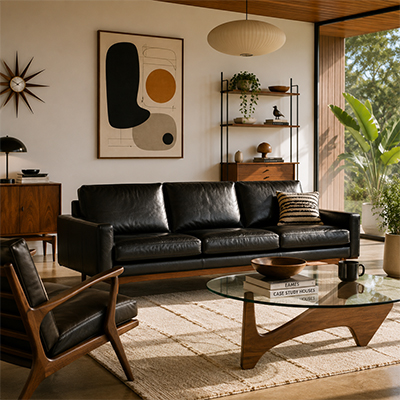
You do not need a professional camera, a rented studio, or a dedicated photography crew to get furniture listed online with credible product imagery. Modern smartphone cameras capture enough resolution, color depth, and detail for platforms like White Studio to produce studio-quality output — provided you follow a few straightforward capture principles.
This guide covers everything from camera settings and product preparation to warehouse versus showroom workflows, category-specific advice for sofas, beds, tables, and cabinets, common mistakes that slow down processing, and what happens after you upload your photos. The goal is practical: help you capture one to three clear smartphone images that become a full sixteen-image commercial pack within twenty-four hours.
Why smartphone furniture photography works
Furniture e-commerce photography has two distinct jobs. First, it must communicate what the product looks like — shape, proportion, material, color, and construction details. Second, it must do so consistently across a catalog that may include hundreds of SKUs photographed in warehouses, showrooms, or factory floors rather than controlled studios.
Smartphone cameras on recent iPhone and Android devices routinely exceed twelve megapixels with sophisticated computational processing. For furniture — large, relatively static subjects photographed at conversational distances — that resolution is more than sufficient. What matters more than sensor size is lighting quality, framing completeness, and angle variety. Those variables are under your control regardless of equipment budget.
White Studio is built around this reality. You upload one to three smartphone photos. Our AI workflow and design reviewers reproduce your product faithfully, then deliver sixteen images: four white-background shots, six detail close-ups, and six lifestyle scenes in styled room environments. The pack arrives with standard 24-hour turnaround. No studio booking, no freight logistics, no per-hour photographer fees.
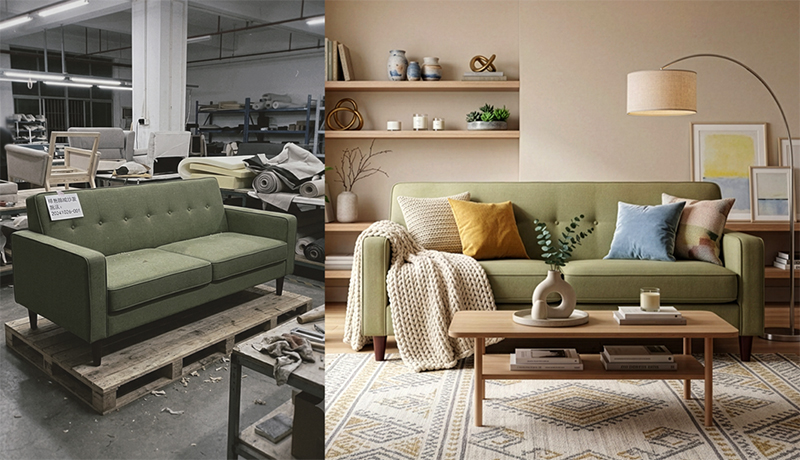
Customer source photo (left) and the delivered still (right), from a real White Studio order. The source is an ordinary phone snapshot.
Five foundational capture principles
These five principles form the baseline for every furniture category. Internalize them before adjusting for specific product types or shooting locations.
1. Use natural daylight
Place your product near a large window or in a well-lit room with diffuse ambient light. Avoid harsh direct sunlight that creates deep, high-contrast shadows across cushions, table legs, or cabinet doors. Skip overhead fluorescent lighting when possible — it casts green or yellow color casts that distort wood tones and fabric hues.
Soft, even daylight preserves accurate colors and material textures. If your warehouse or showroom lacks window access, consider shooting during open bay door hours or using a large white reflector (even a foam board) to bounce available light onto shadowed surfaces.
2. Show the full product
Frame the entire piece in every shot. For sofas and beds, include all legs, arms, and headboard elements. For tables, capture the full tabletop and all visible legs. For cabinets, show the complete silhouette including crown molding or base plinth.
Cropped edges — a cut-off armrest, a partially visible leg, a headboard trimmed by the frame — make it harder to reconstruct proportions accurately. When in doubt, step back. You can always crop tighter in post; you cannot recover information the camera never captured.
3. Capture multiple angles
Upload up to three images from different viewpoints. A reliable starting set: a straight-on front view, a three-quarter angle showing depth and side profile, and a detail shot of fabric weave, hardware, or joinery.
More visual context helps our workflow and reviewers match your product faithfully. A single front-facing photo works for simple silhouettes, but complex pieces — sectional sofas, extendable dining tables, cabinets with glass doors — benefit significantly from additional angles.
4. Keep the background simple
A plain wall, neutral warehouse floor, or uncluttered showroom backdrop works best. Busy backgrounds are not fatal — White Studio can isolate your product — but cleaner scenes speed processing and often improve edge detection and material rendering.
Remove unrelated objects from the frame: shipping labels, price tags, other furniture pieces, stacked cartons. If the product sits on a reflective surface, consider placing a neutral mat beneath it to reduce glare.
5. Avoid heavy filters
Do not apply Instagram-style filters, aggressive HDR, or beauty-mode skin-smoothing equivalents that some phones apply to all subjects. We need true-to-life colors and surfaces.
If your phone offers Pro, RAW, or manual exposure modes, standard JPEG output is perfectly fine for White Studio intake. The priority is accurate representation, not maximum dynamic range or cinematic color grading.
Camera settings that improve furniture photos
Most smartphone cameras default to settings that work adequately for furniture. A few deliberate adjustments improve consistency across your catalog.
Resolution: Use your phone's highest standard photo resolution. Avoid "efficiency" or reduced-resolution modes designed to save storage. Furniture details — stitching, grain patterns, hardware finishes — benefit from full sensor output.
Aspect ratio: Shoot at 4:3 (the native sensor ratio on most phones) rather than 16:9 or 1:1. You lose resolution when cropping to widescreen formats, and the extra vertical space helps capture tall pieces like armoires and headboards.
Focus and exposure: Tap the product to set focus and exposure lock before shooting. On iPhone, hold the focus square to engage AE/AF Lock. On Android, look for a similar lock icon or pro-mode toggle. This prevents the camera from refocusing on background elements between shots.
Lens selection: Use the primary (1x) wide lens for full-product framing. Ultra-wide lenses introduce barrel distortion that bends straight table edges and cabinet sides. Telephoto lenses can help with detail shots but increase handshake blur — stabilize against a wall or use a two-handed grip.
Grid lines: Enable the rule-of-thirds grid in your camera settings. Align the product's vertical edges with grid lines to keep shots level. Slightly tilted furniture photos require correction that can subtly alter perceived proportions.
Night mode and flash: Disable both for furniture photography. Night mode applies multi-frame blending that softens fine texture. Direct flash creates harsh hotspots on leather, glass, and polished wood.
White balance: Leave on automatic unless you notice consistent color casts under specific warehouse lighting. If your phone offers white balance presets, "daylight" works well near windows; "cloudy" adds warmth that can help under overcast skylights.
Preparing products before you shoot
Photography begins before you open the camera app. Fifteen minutes of preparation saves hours of revision and re-shooting.
Clean surfaces. Wipe down table tops, cabinet faces, and leather or fabric upholstery. Remove dust, fingerprints, and shipping residue. A microfiber cloth and mild cleaner handle most furniture surfaces without streaking.
Remove packaging and tags. Strip cardboard corner protectors, plastic wrap, SKU stickers, and hang tags. If labels leave adhesive residue, clean it before shooting — sticky patches catch light unpredictably.
Stage minimally. Straighten cushions, align chair pairs, close cabinet doors evenly, and extend table leaves if the listing includes them. The product should appear as a customer would receive it.
Check for damage documentation. If you are photographing for internal QC as well as e-commerce, capture any existing scratches or dents in separate reference photos. Do not include damage in the primary intake images intended for White Studio processing.
Consistent orientation. Decide whether listings show products facing left or right, and maintain that convention across your catalog. Consistency reduces merchandising friction when uploading to Shopify, Wayfair, or Amazon.
Warehouse versus showroom photography
Where you shoot affects logistics more than final image quality — White Studio processes photos from both environments effectively. Understanding the tradeoffs helps you build a repeatable workflow.
Warehouse advantages: Products are already on-site for picking and shipping. No transport costs. You can batch-photograph new inventory as it arrives. Large pieces like sectionals and king beds stay assembled in staging areas designed for handling.
Warehouse challenges: Lighting is often uneven — mixed fluorescent overheads, limited natural light, concrete floors with color casts. Backgrounds include racking, pallets, and other SKUs. Allocate a designated photo zone with a neutral backdrop if you photograph more than a few pieces per week.
Showroom advantages: Products are styled, lit, and positioned for visual appeal. Ambient lighting is typically warmer and more controlled. Customers may already associate the space with your brand aesthetic.
Showroom challenges: Floor space competes with walk-in traffic. Moving pieces for unobstructed angles disrupts display layouts. Showroom photos sometimes include adjacent products that must be cropped or masked.
Practical recommendation: Use warehouse capture for catalog intake and new-SKU onboarding. Reserve showroom photography for hero pieces where the physical environment adds brand context you want preserved — or skip it entirely and let White Studio's lifestyle scenes provide room context without showroom logistics.
For overseas manufacturers shipping directly to marketplaces, warehouse capture at the point of production is often the fastest path: photograph on the factory floor, upload the same day, receive listing-ready packs before samples reach a domestic studio.
Category-specific guidance
Different furniture types present different capture challenges. Adjust your approach accordingly.
Sofas and sectionals
Step back far enough to capture the full silhouette including all legs and arms. For sectionals, a three-quarter angle showing the corner junction helps reconstruct modular geometry. Photograph each configurable module separately if your catalog lists individual pieces. Include a cushion detail showing fabric texture and seam construction.
Beds and headboards
Include the entire headboard, footboard (if visible), and all legs or platform base. For upholstered headboards, a straight-on front view captures tufting patterns and button placement. For wood or metal frames, a slight angle reveals rail thickness and joinery. If the bed includes storage drawers, photograph at least one drawer partially extended in a separate detail shot.
Tables and desks
Capture the full tabletop edge and all legs. For extendable tables, shoot both closed and extended configurations if your listing covers both states — or note the configuration in your order. Glass-top tables benefit from angled shots that show edge thickness without excessive reflection. Position yourself to minimize reflections of windows, lights, or your own silhouette.
Cabinets, dressers, and storage
Show the complete carcass including crown molding, base plinth, and feet. A straight-on front view documents door alignment and hardware placement. If the piece includes interior organization — adjustable shelves, drawer dividers — a detail shot with one door or drawer open adds useful context. For glass-front cabinets, manage reflections by shooting at a slight angle rather than dead-on.
Common mistakes that slow down results
Even experienced catalog teams make these errors. Avoiding them keeps your White Studio turnaround on schedule.
Shooting too close. Fill-the-frame instincts from portrait photography do not apply. Furniture needs breathing room in the frame so edges remain visible and proportions are unambiguous.
Inconsistent lighting across angles. If your front view uses window light from the left, keep the same light direction for side and detail shots. Changing light direction between uploads creates conflicting shadow information.
Including people or hands. Hands adjusting cushions, workers in reflective surfaces, or partial human figures in frame add elements that require masking and slow processing.
Extreme angles. Low worm's-eye or high bird's-eye perspectives distort proportions. Keep the camera near chest height, roughly parallel to the product's centerline.
Dirty or wrinkled staging. Wrinkled slipcovers, visible floor tape, and dangling power cords read as product defects in processed images.
Mixing color temperatures. Do not combine window-lit shots with tungsten-lit shots from the same upload set. Pick one light source and stay consistent.
Over-compression before upload. Send original camera files through the White Studio order flow. Avoid re-saving through messaging apps that compress images, or screenshotting photos from your camera roll.
What happens after you upload to White Studio
Understanding the downstream process helps you capture intake photos with purpose.
Step 1: Upload and order details. You submit one to three smartphone photos through White Studio's order page, along with basic product information — category, dimensions if available, material notes, and any specific scene preferences.
Step 2: Product analysis. Your photos are the reference for everything that follows: silhouette, proportions, materials, and color. Designers check that reference for furniture-specific details—cushion fullness, wood grain direction, metal finish—before any scene is built.
Step 3: Image generation. From that reference, we produce sixteen images:
- Four white-background shots — front, angles, and an alternate view suitable for marketplace main images and cutout requirements.
- Six detail close-ups — fabric texture, hardware, joinery, and material transitions.
- Six lifestyle scenes — your product placed in styled room environments appropriate to the category (living room for sofas, bedroom for beds, dining space for tables).
Step 4: Quality review and delivery. Human QA checks each image against your source photos before delivery. Standard turnaround is 24 hours. You receive a downloadable pack ready for Shopify, Amazon, Wayfair, Etsy, or your own storefront.
If reconstruction reveals ambiguity — an obscured leg, an unclear material on a cropped edge — the team may request a supplementary photo rather than guess. This is why complete framing and multiple angles matter at capture time.
For a deeper overview of platform capabilities, deliverable specifications, and sample galleries, see What is White Studio?.
Smartphone photography versus hiring a photographer
Traditional furniture photography delivers excellent results. It also carries costs and timelines that do not scale linearly with catalog growth. A straightforward comparison helps you decide when phone capture plus AI processing is the right path.
| Factor | Smartphone + White Studio | Professional photographer |
|---|---|---|
| Upfront equipment | Phone you already own | Camera, lenses, lighting, studio rental |
| Per-SKU cost | $99 (16 images) | $200–$800+ depending on market and scope |
| Turnaround | 24 hours standard | 1–3 weeks typical (scheduling, shoot, retouch) |
| Location flexibility | Warehouse, factory, showroom | Usually requires studio or on-location booking |
| Lifestyle images | 6 scenes included per SKU | Often priced separately or require physical staging |
| Scalability | Parallel processing across SKUs | Sequential booking; photographer availability limits throughput |
| Consistency at volume | Standardized sixteen-image pack structure | Depends on photographer and briefing discipline |
Professional photography remains the right choice for brand campaigns, print advertising, and hero imagery where bespoke art direction justifies premium spend. For catalog intake, marketplace expansion, long-tail SKU coverage, and overseas factory documentation, smartphone capture with White Studio processing offers a rational middle path: credible quality at predictable economics.
Many furniture brands use a tiered strategy: professional shoots for flagship collections, smartphone intake plus White Studio for catalog breadth and new-SKU velocity. The two approaches are complementary, not mutually exclusive.
Building a repeatable capture workflow
Consistency across dozens or hundreds of SKUs matters as much as any single perfect shot. Document a simple standard operating procedure:
- Designate a photo zone in your warehouse or staging area with consistent background and lighting.
- Create a shot list template — front, three-quarter, detail — with example photos for each furniture category.
- Train two or more team members on the capture basics so photography does not bottleneck on one person.
- Photograph on receipt — capture new inventory before it enters racking or ships to customers.
- Upload the same day through White Studio's order flow to maintain a rolling pipeline of listing-ready imagery.
Brands that adopt this rhythm often find their time-to-listing drops from weeks to days — a meaningful advantage on marketplaces where early presence drives early reviews and ranking momentum.
Start with the phone in your pocket
Professional furniture photography equipment exists for good reason, but it is not a prerequisite for listing products online with imagery that converts. Natural daylight, complete framing, multiple angles, clean backgrounds, and unfiltered color accuracy — combined with deliberate camera settings and product preparation — give White Studio everything needed to deliver a full commercial image set.
Whether you are a single-brand Shopify seller photographing a new sofa in your garage, a warehouse team batch-processing incoming inventory, or a manufacturer documenting production at the factory floor, the workflow is the same: one to three thoughtful smartphone photos in, sixteen listing-ready images out within twenty-four hours.
Ready to turn your snapshots into a complete product gallery? Start your project — 16 images, delivered within 24 hours, from as few as one smartphone photo.
For platform details, sample output, and deliverable specifications, see What is White Studio?.