 white studio
How to Create Furniture Lifestyle Images Without a Styled Showroom
By Vee S. · Founder, White Studio
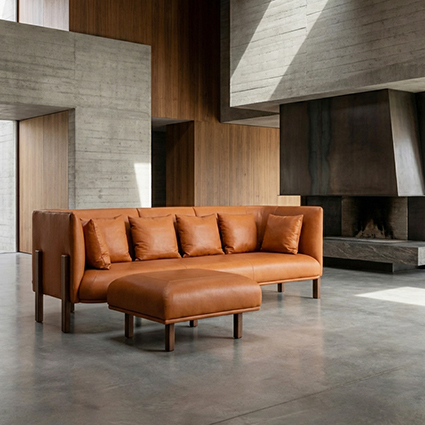
Furniture lifestyle images place your product in a believable room context so shoppers can imagine it in their own home. Creating those images traditionally meant renting locations, hiring stylists, transporting heavy pieces, and spending days in post-production. That workflow still exists — but it is no longer the only path to a complete lifestyle gallery.
This guide walks through how to create furniture lifestyle images from planning through delivery, covering both conventional production methods and modern approaches that let independent brands compete on visual quality without a styled showroom on standby.
Start With the Job Your Lifestyle Images Must Do
Before choosing cameras, locations, or software, define what each lifestyle image must accomplish for your specific product and channel.
Ask directly:
- Which customer segment am I trying to reach — urban minimalist, family traditional, eclectic collector?
- What purchase anxiety am I addressing — scale uncertainty, style compatibility, quality skepticism?
- Where will these images appear — product page gallery, Pinterest, Instagram ads, marketplace thumbnails?
A lifestyle image that works as a Pinterest vertical pin may need different composition than one serving as the fifth slot in a product gallery. Planning outputs before production prevents rework.
For most e-commerce product pages, aim for lifestyle images that:
- Show the full product unobstructed
- Communicate realistic scale relative to the room
- Align aesthetically with your brand positioning
- Remain believable under casual scrutiny — not necessarily architectural photography perfection
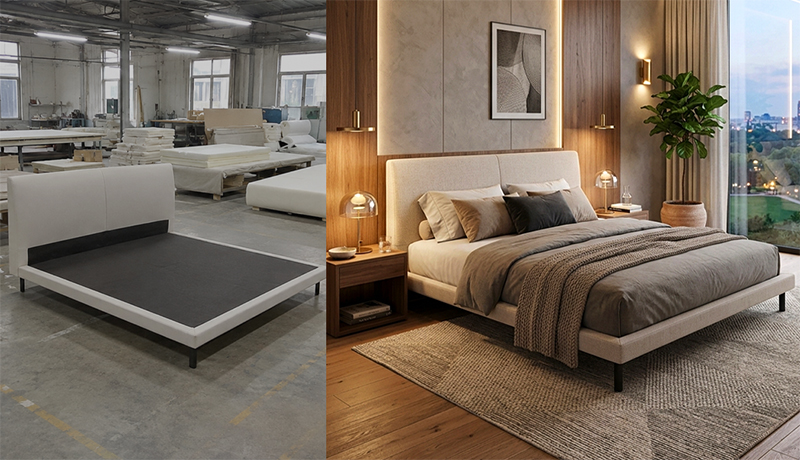
Customer source photo (left) and the delivered still (right), from a real White Studio order.
Step 1: Define Your Visual Direction
Coherent lifestyle content begins with a brief — even a simple one. Document:
Style lane. Clean Modern, Mid-Century, Contemporary, or broader directions like coastal, industrial, or traditional. Limit active styles to two or three across your catalog to maintain shop cohesion.
Palette rules. Neutral walls and floors as default; accent colors pulled from product materials. Avoid trend-specific props that date within a season.
Room types by category. Sofas in living rooms. Beds in bedrooms. Dining sets in dining areas. Case goods in entryways, living spaces, or home offices depending on function.
What to exclude. Cluttered surfaces, competing furniture from other product lines, visible competitor products, inappropriate luxury signaling if your brand targets accessible price points.
White Studio encodes these decisions into the order flow — you select category and style preference at submission, ensuring generated scenes align with structured parameters rather than random room assembly.
Step 2: Capture Strong Reference Material
Whether you shoot a physical lifestyle set or generate scenes digitally, output quality depends heavily on input quality. For AI-assisted lifestyle creation — the most scalable approach for catalog merchants — you typically submit up to three reference photos per product.
Capture these angles in even, natural daylight:
Front three-quarter view. The primary angle most lifestyle compositions extend from. Include the full piece — all legs, arms, and vertical extent.
Side or alternate three-quarter. Reveals depth, cushion thickness, and profile details the front angle hides.
Detail shot. Fabric weave, wood grain, hardware, or joinery — gives production systems texture and material information.
Reference photo guidelines:
- Frame the entire product; avoid cropping edges
- Use simple backgrounds — warehouse wall, plain sheet, uncluttered floor
- Skip phone filters and aggressive HDR
- Maintain accurate color; do not oversaturate
- Capture at highest resolution your device allows
You do not need professional camera equipment. Modern smartphone sensors in good light produce sufficient reference material for commercial lifestyle generation when processed by furniture-specialized systems.
Step 3: Choose Your Production Method
Three primary paths exist for creating furniture lifestyle images. Most brands use one predominantly, with occasional hybrid approaches.
Physical location photography
Rent or use a residential location, transport product, style the set, light with natural or artificial sources, photograph, retouch. Maximum creative control; maximum cost and logistics complexity. Best for campaign hero content and brand storytelling with human models.
In-warehouse vignette photography
Construct partial room corners in warehouse space — backdrop walls, floor surfaces, minimal props. More affordable than location rental but still requires styling skill, lighting equipment, and time per setup. Results vary widely based on team capability.
AI-assisted scene generation
Submit reference photos; receive lifestyle scenes placing your product into styled interior environments with coherent lighting and appropriate scale. Fastest turnaround; most predictable per-unit cost. Commercial quality for standard e-commerce galleries when provider specializes in furniture.
For catalog scale — dozens of SKUs per season — AI-assisted production through White Studio typically offers the best cost-time-quality balance: sixteen images including six lifestyle scenes, twenty-four-hour delivery, $99 per product.
A 10-minute phone shoot checklist
If your reference material is coming from a phone, this is enough:
- Clear the silhouette — pull the piece into open space so legs and outline are unobstructed.
- Use daylight — face the open door or window; avoid lighting one arm while the other sits in shadow.
- Shoot from natural viewing height — about chest height for sofas and chairs; step back for tall cabinets.
- Use the main camera, not ultrawide — ultrawide warps legs, and the distortion follows the product into every scene.
- Capture 1–3 angles — a front hero plus a three-quarter view, and a side or detail if finishes vary.
- Add a material close-up when fabric or grain matters.
- Skip filters and heavy HDR — they change the finish you are trying to preserve.
- Angle away from reflections — mirrors, glass, and chrome facing a window confuse segmentation.
More on capture: how to photograph furniture with a smartphone.
Step 4: Plan Scene Variety Across Your Gallery
A single lifestyle image beats zero, but multiple scenes serve distinct purposes. Plan variety intentionally:
Primary room establishing shot. Wide enough to show product in full context — adjacent furniture spacing, wall relationship, floor coverage.
Alternate camera angle. Same room type, different viewpoint — perhaps closer three-quarter emphasizing upholstery texture in environmental light.
Secondary styling variant. Shift accent palette or prop density while maintaining style lane consistency — reaches shoppers who respond to slightly different room energy.
Category-specific context. Home office for a desk chair; entryway for a console table; bedside context for a nightstand.
Detail-in-context. Closer crop showing product material within the styled environment — bridges pure detail shots and full room scenes.
Six lifestyle scenes — included in White Studio's standard pack — cover this variety without requiring six physical setups.
Step 5: Execute Physical Shoots (When You Choose Them)
If you produce lifestyle images photographically, discipline matters more than budget.
Prepare the product. Clean surfaces, tighten loose hardware, steam upholstery, touch up visible scuffs. Lifestyle photography exposes imperfections contextual shots hide less than white-background isolation.
Control the set. Start with larger furniture pieces, then add rugs, then smaller props. Step back frequently to confirm the product remains focal.
Light consistently. Natural window light from one direction plus fill reflector often outperforms mixed artificial sources. Shoot at consistent times of day if spanning multiple sessions for catalog cohesion.
Shoot tethered if possible. Review composition on a larger screen than your camera LCD — furniture scale errors are easier to catch before teardown.
Capture more angles than you think you need. Storage is cheap; reshooting is expensive.
Post-production for physical lifestyle shoots includes color correction, perspective adjustment, cleanup of distractions, and export at web-ready resolution — typically 2048 pixels on the long edge for e-commerce zoom.
Step 6: Execute AI-Assisted Production
For the scalable path most growing brands adopt:
- Submit order through White Studio with product category, style selection, and up to three reference uploads.
- Review delivery within twenty-four hours — sixteen images total: four white-background, six lifestyle, six detail.
- Validate fidelity against physical product samples — color, proportion, configuration accuracy.
- Request adjustments if your provider supports revision (confirm policy before ordering at scale).
- Export and organize with consistent file naming for your CMS or marketplace uploads.
AI-assisted lifestyle creation excels when:
- Products are too large to transport frequently
- Catalog velocity outpaces studio availability
- Fabric or finish variants need new scenes without reshooting
- Budget caps image spend at predictable per-SKU levels
It works less well when brand campaigns require specific real-world locations, human models, or physical interaction narratives — reserve traditional shoots for those cases.
Step 7: Quality Review Before Publishing
Every lifestyle image — however produced — should pass this review:
Product fidelity. Does the piece in the scene match your inventory — correct legs, arm shape, cushion count, fabric color?
Scale believability. Would a person familiar with furniture guess approximate dimensions from this scene?
Lighting coherence. Do product shadows align with room light direction?
Style alignment. Does the room match your brand brief and coexist peacefully with other catalog images?
Mobile readability. Does the product read clearly at phone gallery size?
Accessibility. Is alt text written — "Walnut credenza in mid-century living room with neutral sofa"?
Reject images that fail product fidelity even if they look aesthetically pleasing. Misleading lifestyle scenes drive returns and damage reviews.
What makes an AI room scene believable
Check every generated scene against the same seven points before it goes live:
- Product fidelity — legs, cushion depth, fabric, and grain match the reference photo.
- Perspective — the product sits on the room's floor plane instead of tilting or floating.
- Scale — the piece is sized plausibly against doors, windows, and other furniture.
- Lighting coherence — light on the product comes from the same direction as the room's light sources.
- Contact shadows — present, soft, and pointing the right way; no shadow looks pasted on.
- Styling restraint — the room supports the product instead of competing with it.
- Material truth — boucle stays boucle and walnut stays walnut; "improved" materials are changed materials.
Step 8: Maintain Catalog Cohesion Over Time
Creating lifestyle images once is insufficient; maintaining visual consistency as your catalog grows is the long-term challenge.
Establish a living style document:
- Approved style lanes and palette boundaries
- Reference examples of on-brand lifestyle scenes
- Reference examples of rejected directions — equally valuable
- File naming conventions and folder structure
- Refresh cadence for underperforming listings
When multiple team members submit orders to White Studio, shared style parameters prevent visual drift — one SKU mid-century, the next ultra-maximalist without strategic reason.
Common Obstacles and Practical Solutions
"We don't have space for lifestyle staging." You do not need permanent staging space for AI-assisted production. Reference photos in a warehouse corner suffice.
"Our products are too custom for templated scenes." Custom form factors benefit most from reference-driven generation — the scene adapts to your specific piece rather than forcing stock overlay.
"Lifestyle images feel fake compared to our authentic brand." Calibrate style brief toward realistic, livable interiors rather than fantasy estates. Restraint reads authentic.
"We can't afford lifestyle for every SKU." At $99 per sixteen-image set with twenty-four-hour turnaround, per-SKU cost is lower than most half-day studio rentals — recalculate against delayed launch revenue, not just photography line items.
"We tried DIY lifestyle and results were inconsistent." Inconsistent DIY output usually reflects missing brief discipline and variable lighting — not inherent impossibility. Structured production parameters fix both.
Measuring Success After Launch
After publishing new lifestyle images, monitor:
- Product page conversion rate (two to four week window minimum)
- Average time on page
- Return reasons mentioning appearance or size
- Customer service photo requests
- Paid ad click-through if using lifestyle creatives
Iterate on style direction based on data, not personal taste alone. Sometimes a calmer, less prop-heavy scene outperforms a visually "richer" image.
Integrating Lifestyle Images Beyond Product Pages
Maximize production investment by deploying lifestyle scenes across:
- Email campaign hero modules
- Social organic posts and paid ads
- Marketplace secondary images (where policy allows AI-generated context for physical products)
- Lookbook PDFs for trade buyers
- Retail partner asset packages
Organize delivered files at receipt — sixteen images per SKU adds up quickly without folder discipline.
The Economics of Lifestyle Image Creation
Compare approximate per-product costs at catalog scale:
| Approach | Typical cost range | Turnaround | Lifestyle count |
|---|---|---|---|
| Location shoot + stylist | $800–$3,000+ | 1–3 weeks | 4–8 scenes |
| In-warehouse vignette | $200–$600 | 2–5 days | 2–4 scenes |
| AI-assisted (White Studio) | $99 | 24 hours | 6 scenes + 10 other images |
Exact figures vary by market and team, but the order of magnitude difference explains why AI-assisted lifestyle production has become standard infrastructure for growing furniture brands.
When to Refresh Lifestyle Content
Update lifestyle images when:
- Product design changes materially
- Brand positioning shifts
- Conversion data identifies gallery weakness
- Seasonal campaigns require refreshed visual language
- Competitor catalogs raise baseline expectations in your category
Refresh does not require reshooting from scratch if you retain reference photo archives — reorder production with updated style parameters.
Start Creating Lifestyle Images Today
Creating furniture lifestyle images no longer requires a styled showroom, a transport crew, or a week on the calendar. It requires clear visual direction, three decent reference photos, and a production partner built for furniture commerce.
Start your project with White Studio — $99, sixteen images including six lifestyle scenes, delivered within twenty-four hours.
To learn more about inputs, outputs, and commercial usage rights, visit What is White Studio?.
Your customers decide with their eyes before they read your specifications. Lifestyle images give those eyes the context they need — and creating them is now a workflow problem with a practical, affordable solution.