 white studio
Furniture Background Generator: Clean Catalog Shots Without a Studio
By Vee S. · Founder, White Studio
Every furniture product page begins with a background decision. Marketplace listings require pure white. Brand storefronts often want lifestyle context. Traditional production achieves both by shooting in a studio with controlled backdrops or building physical room sets — expensive, slow, and difficult to scale across a growing catalog.
A furniture background generator offers a different path. Upload a photo taken anywhere — warehouse, showroom, factory floor — and the software removes the existing environment, replaces it with a professional background, and delivers images ready for e-commerce. No studio rental. No backdrop setup. No location scouting.
This article explains how furniture background generators work, what backgrounds they can produce, how they compare to manual retouching and general background-removal tools, and where platforms like White Studio deliver production-ready results for home furnishing brands.
What Is a Furniture Background Generator?
A furniture background generator is AI software that takes a photograph of furniture in its original environment and replaces the background with a new one — typically a pure white field for catalog compliance, or a styled interior for lifestyle marketing.
The process involves three distinct operations:
- Segmentation — identifying every pixel that belongs to the product versus the environment
- Background replacement — compositing the isolated product onto a new background
- Integration — adjusting lighting, shadows, and edge quality so the product appears naturally placed in the new environment
For furniture specifically, this is harder than it sounds. Furniture has complex edges — spindles, open frames, glass panels, thin legs, tufted surfaces with deep shadow pockets. A background generator trained on simple products (bottles, shoes, electronics) fails on dining chairs with slatted backs or canopy beds with draped fabric.
Furniture-specific background workflows are built around the visual complexity of home furnishings. They handle occluded edges, partial transparency, and the subtle shadow behavior that makes a product look grounded rather than pasted.
Why Background Quality Matters for Furniture E-commerce
Background is not a cosmetic choice. It directly affects discoverability, conversion, and marketplace compliance.
Marketplace requirements. Amazon, Wayfair, and most major furniture marketplaces require white or near-white backgrounds for primary listing images. Non-compliant images are rejected or deprioritized in search results. A background generator that produces clean, spec-compliant whites is a listing requirement, not a preference.
Visual consistency. A catalog where some products were shot in a studio, some in a showroom, and some in a warehouse looks unprofessional. Uniform white backgrounds create visual coherence that customers interpret as brand quality.
Conversion psychology. Lifestyle backgrounds — living rooms, bedrooms, dining spaces — help customers visualize the product in their own home. Studies consistently show that contextual product images increase engagement and conversion compared to isolated catalog shots alone.
SEO and image search. Clean, well-composited product images rank better in Google Image Search and marketplace internal search. Cluttered or inconsistent backgrounds reduce click-through rates.
A furniture background generator solves the background problem at scale: every SKU gets compliant whites and compelling lifestyle scenes from the same source photos.
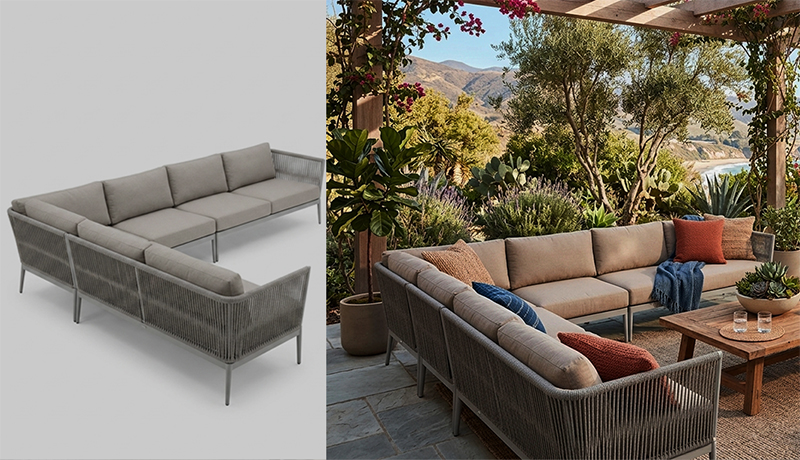
Customer source photo (left) and the delivered still (right), from a real White Studio order.
Types of Backgrounds a Generator Can Produce
Pure White Backgrounds
The standard for marketplace catalog shots. The generator removes the original environment and composites the product onto RGB 255/255/255 white with natural contact shadows beneath legs, bases, and frame elements.
Quality indicators for white-background output:
- Clean edges — no halos, fringing, or color spill from the original background
- Natural shadows — soft contact shadows that ground the product without looking artificially added
- Even product lighting — no residual color cast from the original environment
- Correct perspective — the product appears to sit on a flat surface, not float
White Studio includes 4 white-background catalog shots per SKU in its standard 16-image package — front, angles, and an alternate view.
Lifestyle Interior Backgrounds
For brand storefronts and conversion-focused product pages, lifestyle backgrounds place the product in styled interior environments. The generator selects or creates room settings — modern living rooms, mid-century dining spaces, contemporary bedrooms — and integrates the product with correct scale, lighting direction, and shadow behavior.
Quality indicators for lifestyle output:
- Perspective match — the product's angle aligns with the room's vanishing points
- Scale accuracy — the product is appropriately sized relative to architectural elements
- Lighting coherence — product lighting direction matches the scene's light sources
- Material preservation — fabric, wood, and metal textures remain true to the source photo
White Studio includes 6 lifestyle scene images per SKU, generated in style directions including Clean Modern, Mid-Century, and Contemporary.
Hybrid Approaches
Some brands use white backgrounds for marketplace listings and lifestyle scenes for their DTC storefront and social media. A furniture background generator that produces both from the same source photos eliminates the need for separate production workflows.
How Background Generation Works Technically
Semantic Segmentation
The foundation of any background generator is accurate product isolation. Modern neural networks classify each pixel in the image, producing a mask that defines the product boundary.
Furniture segmentation challenges include:
- Thin structural elements — chair legs, table aprons, bed frames
- Open geometry — slatted backs, open shelving, wire frames
- Similar-color backgrounds — a beige sofa against a beige warehouse wall
- Reflections and glass — mirrored surfaces, glass tabletops, acrylic components
- Complex occlusions — products partially hidden by other objects in the frame
A furniture-focused workflow with human review handles these cases far better than a one-click general-purpose remover, because someone checks exactly the edges that generic tools get wrong.
Background Inpainting and Replacement
Once the product is isolated, the generator replaces the background. For white backgrounds, this is a straightforward composite with shadow generation. For lifestyle scenes, the process is more complex:
- A room environment is selected or generated matching the requested style
- The product is placed at the correct scale and perspective within the scene
- Lighting on the product is adjusted to match the scene's illumination
- Contact shadows and ambient occlusion are computed to ground the product
- Edge blending ensures no visible seam between product and environment
Post-Processing and Quality Control
Commercial background generators apply final adjustments: edge refinement, color correction, shadow tuning, and resolution upscaling where needed. Human reviewers inspect output for artifacts — the telltale signs of AI compositing that undermine commercial credibility.
Furniture Background Generator vs. Manual Retouching
Before AI background generators, the standard approach was manual retouching in Photoshop:
| Dimension | Manual Retouching | AI Background Generator |
|---|---|---|
| Time per image | 30–90 minutes | Minutes (automated) |
| Cost per image | $50–$200 | Defined pack price; see scope and pricing |
| Lifestyle scenes | Requires separate stock photos or 3D renders | Generated from same source photo |
| Consistency | Varies by retoucher | Algorithmically consistent |
| Scalability | Linear cost per image | Flat rate per SKU |
| Turnaround | Days to weeks | 24 hours for full package |
Manual retouching produces excellent results for individual hero images. It does not scale to a 100-SKU catalog where each SKU needs 4 white backgrounds and 6 lifestyle scenes. The math is straightforward: 1,000 manually retouched images at $75 average equals $67,500. For a catalog rollout, compare the agreed asset count, source capture, visual review and production capacity. White Studio’s Standard pack covers one product; larger projects are separately scoped.
Furniture Background Generator vs. General Background Removers
Tools like Remove.bg, Photoroom, and Canva's background remover handle simple products well. Furniture is not a simple product.
Common failures of general background removers on furniture:
- Incomplete edge detection — missing spindles, cutting off thin legs, erasing open-frame sections
- Color fringing — visible halos around complex edges, especially on dark products against light backgrounds
- No lifestyle capability — white background only, no scene generation
- No shadow generation — products appear to float rather than sit on a surface
- Single-image output — no packaged gallery of catalog + lifestyle + detail shots
A furniture background generator is purpose-built for the category. It handles complex geometry, generates both white and lifestyle backgrounds, produces complete image packages, and includes quality review.
Preparing Photos for Background Generation
Better input produces better backgrounds. Guidelines for source photos:
Background contrast. Photograph the product against a background that contrasts with its color. A dark walnut table against a white wall segments more cleanly than against a brown warehouse floor.
Even lighting. Diffused, even light reduces harsh shadows that confuse segmentation algorithms. Avoid direct sunlight and mixed color temperatures.
Full product visibility. Ensure the entire product is visible in frame — no partial cropping, no significant occlusion by other objects.
Multiple angles. Provide 1–3 photos from different angles. The background generator uses these to produce varied catalog and lifestyle views.
Smartphone is sufficient. Modern phone cameras provide adequate resolution. Professional camera equipment is not required.
White Studio accepts 1–3 phone photos and delivers a complete 16-image package — 4 white backgrounds, 6 lifestyle scenes, and 6 detail close-ups — within 24 hours.
Use Cases for Background Generation
Marketplace listing compliance. Generate Amazon- and Wayfair-ready white backgrounds from warehouse photos without a studio.
Showroom-to-catalog conversion. Your showroom has styled displays, but marketplaces need whites. Generate compliant catalog shots from showroom photos.
Catalog visual unification. Products photographed over years in different locations get consistent backgrounds without reshooting.
Lifestyle scene production. Create interior context images without building physical room sets or licensing stock photography.
International market adaptation. Generate lifestyle scenes with region-appropriate interior styles from the same source photos.
Seasonal background refreshes. Update lifestyle scene styling for new seasons or campaigns without new photography.
Limitations
Honest evaluation requires acknowledging boundaries:
- Extremely low-contrast scenes. A white product against a white wall provides insufficient edge information for clean segmentation.
- Transparent and reflective materials. Glass tabletops, mirrored surfaces, and clear acrylic components remain challenging for all background generation tools.
- Heavily damaged or obscured products. The generator replaces backgrounds; it does not repair product condition.
- Non-furniture categories. Furniture-focused workflows may perform poorly on other product types.
These limitations are manageable with reasonable source photo preparation. They define the boundary between what background generation handles well (catalog coverage at scale) and what still requires traditional production (complex creative campaigns).
White Studio's Background Generation Workflow
White Studio integrates background generation into a complete furniture photography pipeline:
- Upload 1–3 photos of your product (sofa, bed, table and chair, or cabinet)
- Select style direction: Clean Modern, Mid-Century, or Contemporary
- Choose background type: Pure White, Lifestyle Scene, or Both
- Receive 16 images within 24 hours:
- 4 white-background catalog shots
- 6 lifestyle scene images
- 6 detail close-ups
- Deploy across Shopify, Amazon, Wayfair, and your DTC storefront
Pricing is a flat pack per SKU (see pricing). No subscription. No per-image charges. No studio required.
Marketplace-ready white: what platforms expect
Exact rules vary by platform and change over time, so treat these as recurring themes and confirm current specs with the platform (for Amazon, the Seller Central product image requirements page):
- Pure white field — usually RGB 255, 255, 255. Off-white paper and gray gradients often fail review.
- Product only — no props, text, badges, watermarks, or inset swatches on the main image.
- High frame fill — many guides cite roughly 85% of the frame. Crop evenly around real proportions; never stretch a wide sectional or tall bookcase to fit.
- Enough resolution for zoom — 1,000+ px on the long side is a common floor; 2,000+ is safer for furniture detail.
- Grounding, not a room — a soft contact shadow under legs is usually tolerated; floor lines or cast shadows that imply an environment are not.
Dark finishes, glass tops, thin metal legs, and tufted upholstery are where generic cutout tools fail: gray halos, fringing, and missing leg tips. Dark sofas need clean separation from the white field without a halo, which is where human review earns its keep.
White images and lifestyle scenes do different jobs. White answers what exactly is this SKU? and fills marketplace main-image slots; lifestyle answers how does it live in a home? and does the persuading in secondary slots and on your own site. Ship both. Platform-specific rules are covered in our Amazon and Wayfair guides.
Getting Started
Background generation is the fastest path from warehouse photo to listing-ready imagery:
- Take 1–3 smartphone photos of your product against a relatively plain background
- Upload to White Studio and select your style and background preferences
- Receive your 16-image package within 24 hours
- Upload to your sales channels
For a full overview of the platform's capabilities, read What is White Studio?.
Conclusion
A furniture background generator eliminates the studio requirement for professional product imagery. By removing cluttered environments and replacing them with compliant white backgrounds and styled lifestyle scenes, it makes catalog-quality photography accessible from any location — warehouse, showroom, or factory floor.
The technology works when it is furniture-specific: built around the category's visual complexity, constrained to your actual product, and reviewed for commercial quality. General background removers handle simple products. Furniture background generators handle the structural complexity that defines home furnishing e-commerce.
Ready to replace your product backgrounds? Start your project — 16 images including 4 white-background catalog shots and 6 lifestyle scenes, delivered within 24 hours.