 white studio
Wayfair Furniture Image Requirements: Silo, Lifestyle, and Pack Workflow (2026)
By Vee S. · Founder, White Studio
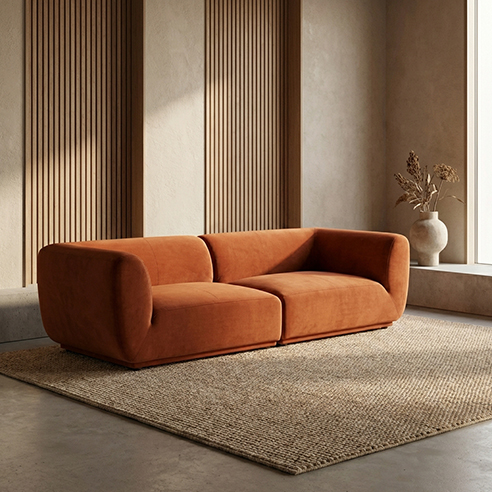
Wayfair furniture image requirements center on clean silo (isolated) heroes, believable lifestyle/room scenes, and detail shots that reduce returns. Exact portal specs live in Partner Home / supplier style guides and should be verified before bulk upload. Brands that standardize per-SKU packs (silo angles + lifestyle + details) onboard faster than teams treating every SKU as a custom shoot.
White Studio turns 1–3 real product photos into designer-curated packs in 24 hours via image-to-image—so portal imagery stays true to the piece you ship, not a text-to-image invention.
This guide covers the image types Wayfair asks for, the published technical minimums, quality bars, rejection patterns, and production without a studio—then maps shot types to Lite vs Standard so supplier ops can move inventory without waiting on a studio queue. Wayfair's public baseline is its supplier guide Imagery 101; program-specific rules live in Partner Home. Always re-check live Partner Home docs for your account type; policies differ somewhat between direct suppliers, private-label programs, and curated marketplace integrations.
Why Wayfair imaging standards exist
Wayfair’s customer experience assumes visual consistency across an enormous assortment. Unlike a single-brand DTC site where art direction can drift seasonally, a marketplace aggregator needs predictable grid behavior: similar lighting logic, coherent lifestyle styling tiers, silo images that composite cleanly into promotional templates, and detail shots that answer material questions without a support call.
For furniture specifically, returns are expensive and review scores persist on product pages. Image standards reduce mismatch between expectation and delivery—protecting conversion and supplier scorecards at the same time. Understanding Wayfair furniture image requirements early prevents onboarding delays, catalog holds, and reshoot cycles after rejection.
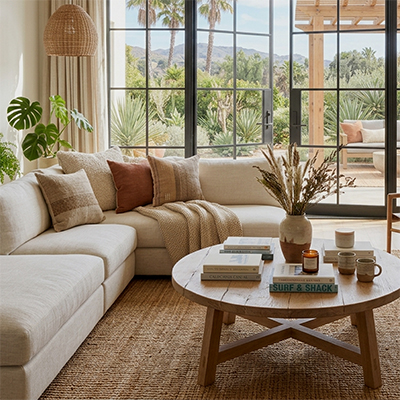
A delivered lifestyle still of the kind furniture marketplaces expect alongside silo images.
What images does Wayfair need for furniture?
Wayfair product pages typically need a mix of silo (isolated) heroes, lifestyle / room scenes, and detail / feature coverage—sometimes with optional dimension graphics. Wayfair's own Imagery 101 names five recommended types: single-product silhouette (silo), zoomed-in environmental, zoomed-out environmental, functional, and dimensional—and says one image is not enough: start with at least two. Exact slot counts for your program live in Partner Home.
Core image types (keep these roles)
Silo images (white or neutral isolate). Product isolated from environment—analogous to marketplace main-image clarity, though Wayfair may allow subtle neutral tones depending on program and style-guide era. Silo shots anchor thumbnails and comparison views. Expect emphasis on clean edges, full product visibility (no cropped legs or headboards), accurate color, and resolution suitable for zoom. Multiple angles are common: front, three-quarter, and back or alternate configuration views for asymmetrical pieces.
Lifestyle or room scenes. Wayfair leans on room context so shoppers can visualize scale and style. Style guides often define decor density, lighting mood, and floor/wall neutrality so scenes feel cohesive across brands. Furniture scale must be believable—oversized rugs paired with undersized sofas confuse dimension perception and drive returns. Confirm whether your program expects custom scenes or selects from approved styling tiers (contemporary, traditional, coastal, industrial, and similar).
Detail and feature images. Close views of fabric, wood grain, hardware, drawer interiors, and mechanisms support high-consideration purchases. For multi-box shipments, images clarifying what’s included in each carton reduce assembly tickets.
Dimension and informational graphics (optional / program-dependent). Some programs accept dimension overlays or feature callouts in designated slots. Keep graphics legible at mobile sizes; overcrowded annotation reduces clarity.
Image-type → pack map (Lite vs Standard)
| Shot type | Job it does | Lite (4) | Standard (16) |
|---|---|---|---|
| Silo front / 3-quarter / back | Thumbnail clarity, comparison, configuration truth | Quality/silo test on one hero angle | Fuller multi-angle silo coverage |
| Lifestyle primary | Room-fit confidence, style storytelling | One lifestyle test scene | Multiple lifestyle contexts |
| Details / materials | Trust on weave, grain, hardware | One detail in the 4-image test mix | Dedicated detail slots |
| Dimension graphic | Scale honesty where program allows | Usually defer | Add when Partner Home expects it |
How to read the map: Lite (4 images) is a low-risk fidelity test on one supplier SKU—prove silo + lifestyle quality before you batch a container. Standard (typically about 16 images: white/neutral silo + lifestyle + detail groups) is the practical listing-readiness set when you need fuller coverage for portal slots. Neither number is a Wayfair-mandated count; both are production packs you map to the checklist your Partner Home guide actually requires.
Need to prove silo/lifestyle fidelity on one onboarding SKU without a studio day? Start with Lite (4 designer-curated images from your real photos), then expand winners to Standard. See cases for proof and order to start.
Technical specifications
Wayfair's published baseline in Imagery 101:
- Resolution: at least 1,000 × 1,000 px to be featured on Wayfair; 2,000 × 2,000 px is recommended so detail holds up in zoom
- Color profile: sRGB for web-consistent display
- File formats: JPEG and PNG predominant; TIFF sometimes accepted for archival uploads
- File size limits: Portal-specific maximums—compress thoughtfully without visible artifacting
- Aspect ratios: Consistent cropping within variant families prevents layout jumps on category pages
File naming conventions may be prescribed (SupplierSKU_Silo_Front.jpg) to automate ingestion. Follow templates exactly to avoid processing errors. Do not treat this section as a substitute for live Partner Home / supplier style guides—re-download the current guide for your tier before bulk upload.
Quality and styling standards
Beyond pixels, supplier feedback repeatedly flags:
- Lighting — even, diffused; textures (linen, oak, brushed nickel) should read clearly
- Color accuracy — represent the SKU sold; disclose natural wood/stone variance; avoid oversaturation
- Styling restraint — lifestyle complements the product; props shouldn’t compete or date instantly
- Condition — no damage, dust, or protective film; pick clean warehouse samples
- Catalog consistency — repeatable silo lighting and scene templates beat one-off drama—structured packs help without inventing a prettier sofa
Category notes (sofa, bed, table & chair, cabinet)
- Sofas / seating — full silhouette including legs; modular layouts distinct if sold separately; cushion/arm match the SKU
- Beds — mattress-included vs frame-only clear; headboard/footboard obvious; slats helpful for platforms
- Dining — edge profile and leg attachment; leaves/extensions in both states when sold that way; believable chair scale in lifestyle
- Cabinets / storage — interiors with doors open; anti-tip / accessory callouts only where guidelines allow
White Studio maps intake to those four families via image-to-image from real phone/warehouse photos + designer curation—not Midjourney invention or cutout-only apps. Service overview: AI furniture photography.
Supplier onboarding and approval workflows
Image review often gates SKU go-live. Typical loop: download Partner Home templates → create assets → upload → rejection with reason codes (background, resolution, wrong product, styling) → revise. Batch failures delay whole containers—pilot one SKU (Lite is built for that) before scaling.
Common rejection reasons
| Issue | Remediation |
|---|---|
| Silo background not clean | Regenerate isolation on approved white/neutral |
| Low resolution or compression artifacts | Export higher-quality masters from source assets |
| Product mismatch vs spec sheet | Reconcile SKU mapping; reshoot or regenerate correct unit |
| Lifestyle scale misleading | Replace scene with proportional staging |
| Color drift from sample | Recalibrate against swatch; adjust white balance |
| Unauthorized props or competitor products visible | Reshoot/regenerate scene; audit background objects |
| Missing required angles | Add back view or detail per style-guide checklist |
Document rejection codes and build an internal playbook so revisions do not repeat across SKUs.
Wayfair vs Amazon vs Shopify (short)
Keep channel jobs distinct—don’t clone each platform’s deep policy page:
- Amazon — strict pure-white main images; see Amazon furniture product images requirements.
- Wayfair — silo plus lifestyle storytelling (this page).
- Shopify — flexible backgrounds; standardize your own PDP set via Shopify furniture product images.
Maintain layered masters (silo / lifestyle / detail) and map one Standard pack across portals instead of reshooting per channel.
Producing Wayfair-ready images without a studio
Many suppliers are far from studios; shipping samples delays go-live. Practical path:
- Warehouse capture SOPs—even light, full frame, about 3 angles, minimal filters
- Upload 1–3 phone photos
- Receive curated silo + lifestyle + detail packs via image-to-image + human QA in 24 hours
- Internal QA against Partner Home → portal upload with prescribed naming
White Studio is built for that: structured packs at per-SKU pricing, catalog-true to the piece you ship. Capture tips that beat gear upgrades: full silhouette, even light, true-ish color, one clear material detail when fabrics/woods are complex. Warehouse floors are fine if the product reads.
Scorecards, pipeline, and when studio still wins
Wayfair tracks supplier performance—fill rates, damage, satisfaction. Imagery affects those metrics when the delivered piece does not match visuals. Keep lifestyle scale honest, avoid extreme wide-angle distortion, and retire outdated images when SKUs change.
Treat imagery as factory output: slot maps to portal fields, swatch libraries for color QA, imaging orders timed to container arrivals, archived masters, and at least two trained capture contacts. What is White Studio? covers deliverable breakdowns; packs and pricing live at /pricing; rights/ops at /faq.
Reserve traditional studio for hero campaigns and proven top SKUs. Long-tail variants rarely amortize bespoke shoots—Lite pilots and Standard packs keep margin intact.
Checklist before portal submission
- Download the current Partner Home / supplier image guide for your tier
- Confirm silo cleanliness; lifestyle scale and styling tier; detail coverage
- Export sRGB JPEG/PNG at required resolution; apply file naming exactly
- Cross-check SKU attributes vs depicted configuration; second-person review
- Map pack slots (Lite pilot → Standard listing readiness) to portal fields
FAQ
Does Wayfair require pure white like Amazon?
Not always in the same absolute way. Wayfair expects clean silo / isolate heroes, which are often white or very neutral depending on program and style-guide era—but lifestyle/room scenes are a core part of the Wayfair experience. Always verify Partner Home for your account. For Amazon’s stricter main-image white rules, see our Amazon furniture image requirements guide.
How many lifestyle shots does Wayfair need?
Partner Home and style guides define required vs recommended slots for your program. Functionally, plan at least one strong primary lifestyle for room-fit confidence, then add more when merchandising or scorecards reward richer storytelling. Do not invent a universal portal count—map your guide to the pack table above.
Is Lite enough for onboarding?
Lite (4 images) is enough to prove fidelity and pilot one SKU through review. Fuller listing readiness—multi-angle silo, lifestyle coverage, details—usually maps better to Standard (16 images). Start Lite if you are blocked on quality proof; expand to Standard before batching a container.
Who owns the images / commercial rights?
See /faq for current commercial-use language for White Studio packs. Confirm your supplier agreement for any portal-specific rights or exclusivity clauses.
Should we add product video before stills are solid?
Usually no. Get silo + lifestyle + detail stills approved first. Video can support the listing alongside a clear image gallery. White Studio product video is ordered independently from 1–3 photos, with AI-assisted footage and human editing.
Can warehouse phone photos work as input?
Yes—if the piece is fully visible and reasonably sharp. White Studio’s pipeline is image-to-image from real product photos + designer curation. Extremely dark or occluded inputs still limit any pipeline.
Next step: ship a Wayfair-ready pack without the studio queue
Wayfair furniture image requirements come down to silo clarity, lifestyle context, detail coverage, and specs that survive zoom—verified in Partner Home. Rejections cost time; mismatch costs returns.
Standardize capture SOPs, use Lite for onboarding pilots, Standard for fuller listing coverage, and QA against your portal guide. Warehouse phone photos are enough input when processed with furniture-specific image-to-image plus designer curation.
Validate one SKU end-to-end before batching a container. Ready for a fuller set? Choose Standard (about 16 images) or prove fidelity with Lite. Explore AI furniture photography, browse cases, start an order, or read What is White Studio?. Multichannel: Amazon requirements · Shopify PDP images · /faq.