 white studio
Shopify Furniture Product Images: The Listing Photo Set That Sells
By Vee S. · Founder, White Studio
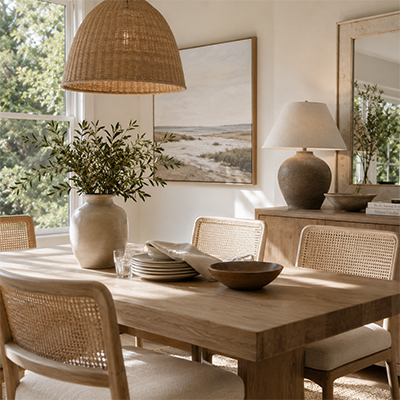
Selling furniture on Shopify is a visual business. Your product pages compete with other DTC stores, marketplace listings, and social feeds where shoppers form a first impression in seconds. Strong Shopify furniture product images do more than fill a theme slot—they answer the questions a buyer cannot resolve in a showroom: How big is this piece? What does the fabric look like up close? Will it fit my room?
This guide covers what Shopify does and doesn’t require, a recommended furniture PDP image set, sizing and consistency standards, and how to produce that set without a studio. It also folds in a practical how many images / which shot types checklist so you can plan coverage before you spend on photography—or on ads against a thin gallery.
What Shopify does (and doesn’t) require for furniture images
Shopify is flexible. Unlike Amazon, it does not force a pure white background on your main image. Themes, apps, and your brand system decide how galleries look. That freedom is useful—and easy to waste.
What Shopify does care about in practice:
- Upload limits and formats. Per Shopify's product media documentation, images must be under 20 MB and at most 5,000 × 5,000 px (25 megapixels); 2,048 × 2,048 px usually displays best for square images. PNG and JPEG are the recommended formats (WebP, HEIC, and others are accepted). Keep masters sharp but compressed so collection and PDP pages stay fast.
- Theme behavior. Crops, zoom, and aspect ratio are theme-dependent. A square-friendly theme will punish inconsistent portrait crops; a tall-piece-friendly layout may clip square-only workflows on bookcases and floor lamps.
- Self-imposed standards. Because the platform won’t enforce marketplace-style rules, you must standardize aspect ratio, lighting language, and shot order—or your collection grid will look like five different studios shipped five different catalogs.
For furniture, treat Shopify as an owned storefront with optional marketplace exports. Build a coherent brand gallery first; keep white-background masters ready when you push the same SKU to Amazon or wholesale portals.
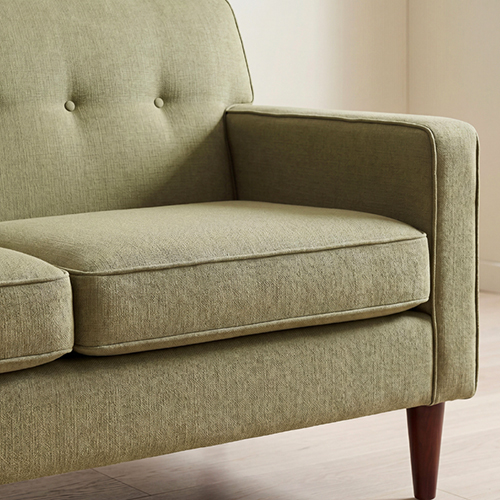
A delivered detail shot. Close-ups like this answer material and build-quality questions before they become returns.
How many product images does a furniture listing need?
Furniture listings convert better when images answer scale, material, and room-fit—not when they repeat the same front angle. Public ecommerce guides often recommend roughly 5–8 useful images for many products, with furniture and home frequently cited higher (toward a fuller lifestyle + detail set, often discussed in the about 6–10+ range). A practical plan: white-background hero, 1–2 alternate angles, lifestyle/room context, material close-ups, and a scale or dimension view. Coverage beats a magic number.
Why the “magic number” varies
Advice online disagrees for good reasons:
- Category complexity — A simple side table needs fewer angles than a modular sectional with finish options.
- Channel rules — Amazon-style main-image constraints differ from Shopify’s flexible gallery.
- Returns risk — Higher AOV furniture justifies more material and scale proof.
- Page weight — More images help only if they are optimized and purposeful.
So don’t chase “exactly eight.” Chase a checklist of shot types, then fill enough slots that a mobile shopper can scroll without guessing.
What each image should do (the real checklist)
| Shot type | Job it does | Typical slot |
|---|---|---|
| White / neutral hero | Silhouette, color honesty, collection thumbnail + feed-ready master | Image 1 |
| Alternate angles | Depth, arm height, back profile, modular arrangement | 2–3 |
| Lifestyle / room context | Style fit and emotional confidence on your owned PDP | 1–3 scenes |
| Material / detail | Weave, grain, stitching, hardware trust | 2–4 close-ups |
| Scale / dimensions | Reduce “it looked smaller online” returns | Overlay or dedicated graphic |
| Optional functional | Drawers open, recline, leaf extended | As needed by SKU |
Minimum viable vs competitive:
- about 4 images (starter / test): Hero, one lifestyle and one detail. Enough to validate quality or unblock a launch—not enough to compete on a high-consideration sofa.
- about 5–8 images (useful baseline): Hero, angles, at least one lifestyle, details, scale cue.
- about 8–13 images (competitive furniture PDP): Fuller lifestyle coverage plus details that survive zoom and paid traffic.
Map that to packs when you need production without a studio: Lite (4 images) to test one hero SKU; Standard (16 images) when you want real listing coverage. See how to create furniture lifestyle images for the phone-photo → gallery story.
Recommended image set for a furniture PDP on Shopify
Think of the gallery as a guided tour, not a photo dump.
1. Hero on white or light neutral. Primary thumbnail for collection grids, Google Shopping-style feeds, and retargeting. Clean background keeps focus on silhouette and color.
2. Three-quarter and side angles. Reveal depth and proportion. For sectionals, show the configuration clearly.
3. Detail shots. Stitching, wood grain, hardware, cushion edges—whatever shoppers pinch-zoom.
4. Lifestyle / in-room scenes. Help buyers who think in rooms, not SKUs. On Shopify you control these slots; use them.
5. Dimension or scale reference. Overlay measurements or a clear scale cue. A short product video is a separate order from 1–3 product photos. It does not replace a coherent still set.
A traditional studio day for every SKU gets expensive fast when you launch weekly. That is why many merchants separate capture (quick phone references) from production (curated packs).
Sizing, zoom, and consistency across the catalog
Phrase sizing carefully: education sites and theme vendors commonly recommend roughly 2048×2048 square masters for Shopify product images so zoom and retina displays look sharp without unnecessary weight. Treat that as widely cited merchant guidance—not as a hard “Shopify law” unless you confirm the latest language in Shopify’s own help docs for your theme and plan. Practical habits that still hold:
- Upload one sharp master; let Shopify’s CDN serve responsive variants when your theme is set up correctly.
- Prefer consistent aspect ratios across a collection so grids don’t look ragged.
- Compress aggressively enough for mobile PDPs; furniture detail still needs enough resolution to zoom.
- Write descriptive alt text (“Walnut dining table, front three-quarter on white”)—useful for accessibility and image discovery.
- Name files consistently before upload for ops hygiene, even if the CDN renames assets.
Consistency beats peak drama. Same background tone family for packshots, similar camera height by category, unified lifestyle aesthetic, and matching color language across the catalog. Themes with generous whitespace reward clean photography; busy themes punish mixed crops.
White background vs lifestyle on Shopify
White / neutral wins for comparison shopping, feed-friendly masters, email layouts, and marketplace exports. If you sell on Shopify and Amazon/wholesale, white-background heroes often remain the canonical product representation.
Lifestyle wins for emotional conversion on your owned store. Mid-century, coastal, minimalist—room scenes communicate direction that a dimension chart cannot.
The strongest furniture stores use both: clarity for the grid and feeds, aspiration for the PDP scroll. The bottleneck is volume—forty SKUs × a competitive set is hundreds of assets. That is exactly where curated AI furniture photography packs earn their keep: same real product, multiple commercial contexts, without inventing a different sofa.
Want to test fidelity on one collection hero before you rebuild the whole catalog? Start with Lite (4 designer-curated images from your real photos), then expand winners to Standard.
Building the set without a studio
Workflow options merchants actually use:
- Traditional studio — Highest physical control; highest cost and lead time. Best for flagship campaigns.
- In-house warehouse shoot — Seamless paper + softboxes can deliver packshots; lifestyle quality usually suffers without styling bandwidth.
- 3D / CAD rendering — Strong when you have clean models; expensive to stand up and slow when finishes change weekly.
- Product-preserving AI packs — Upload 1–3 real phone photos; get white-background, lifestyle, and detail coverage with human art direction.
White Studio is built for the fourth path: image-to-image from the piece you sell, plus designer curation—not Midjourney-style invention of a prettier SKU. Learn the category framing in what is AI furniture photography, then the service overview at What is White Studio?.
Capture tips that matter more than gear: full silhouette in frame, even light, true-ish color, and at least one clear detail if materials are complex. Warehouse floors and factory corners are fine if the product reads clearly.
Using White Studio on Shopify
If your catalog already lives in Shopify, order from the site via /order—upload 1–3 photos, pick Lite or Standard, then place the delivered stills on your PDP.
How packs map to PDP goals:
| Pack | What you get | Best for |
|---|---|---|
| Lite | 4 images | Quality test on one SKU; unblocking a thin listing |
| Standard | 16 images (typically 4 white-background, 6 lifestyle, 6 detail) | Full furniture PDP / multi-channel listing coverage |
Image packs are delivered within 24 hours of payment confirmation with complete product photos. Product video can be ordered independently: a 25–30 second, human-edited film from 1–3 product photos.
The differentiator to hold onto: consistent, art-directed packs from real product photos so your Shopify grid doesn’t look like five different AI toys. That is the point of designer curation on top of image-to-image generation.
QA checklist before you publish
Before a SKU goes live:
- Hero reads at thumbnail size on mobile collection grids.
- Color matches physical samples under a neutral screen if you can.
- Proportions feel honest — lifestyle scenes shouldn’t exaggerate with wild wide-angle distortion.
- Legs, shadows, and contact with the floor look real — floating furniture kills trust.
- Variants (fabrics, legs, sizes) are represented or clearly noted when imagery is shared.
- Mobile crop and zoom feel usable; pinch-zoom should reveal material, not mush.
- Alt text exists on every gallery image.
- Shot-type coverage passes the how-many checklist above—not three near-identical fronts.
Run the purchase flow yourself on a phone. Furniture buyers increasingly decide there.
FAQ
How many images should a sofa listing have on Shopify?
Enough shot types to answer scale, material, and room-fit. Many public guides cluster around 5–8 useful images for general products, with furniture often pushed higher. For competitive sofas, plan toward a fuller set (lifestyle + details + angles)—commonly in the 8–13 range—rather than three near-duplicate fronts.
Does Shopify require white backgrounds for furniture?
No. Shopify is flexible on backgrounds. White or neutral heroes still help for feeds, comparison modules, and marketplace exports; lifestyle scenes help on your owned PDP. Standardize your own rules.
What image size should I upload?
Merchant and theme education content commonly recommends 2048×2048 square masters for product zoom and retina clarity. Confirm against Shopify’s current help docs and your theme’s guidance; don’t treat third-party blogs as official law. Keep files compressed enough for mobile performance.
Can I use phone photos as the source?
Yes—if the piece is fully visible and reasonably sharp. Services like White Studio are built to start from 1–3 real product photos and deliver listing packs. Extremely dark or occluded inputs still limit any pipeline.
How do Lite and Standard relate to my gallery?
Lite (4 images) is a low-risk quality test. Standard (16 images) is the practical “fill a real furniture PDP” path. Start from /pricing and /order.
Should every finish variant get a full 16-image set?
Not always on day one. Prioritize hero finishes with full coverage; use shared lifestyle language carefully and add dedicated shots where color or material shifts buyer perception. Expand with Standard packs as variants prove demand.
Is product video required?
No. Stills that cover the checklist come first. Add short video for PDP autoplay or paid social once the still gallery is trustworthy.
Next step: ship a consistent Shopify furniture gallery
Shopify furniture product images work best as a consistent set—hero, angles, details, lifestyle—not a single packshot. The platform won’t enforce Amazon-style rules for you, so standardize crop and style yourself, then export white-background variants when channels demand them.
When you are ready to fill that checklist from the piece already in your warehouse, choose the Standard pack (about 16 images) or test with Lite. Explore AI furniture photography, read what is AI furniture photography, skim the how to create furniture lifestyle images walkthrough, and start an order.