 white studio
What Is AI Furniture Photography? A Practical Guide for Furniture Brands
By Vee S. · Founder, White Studio
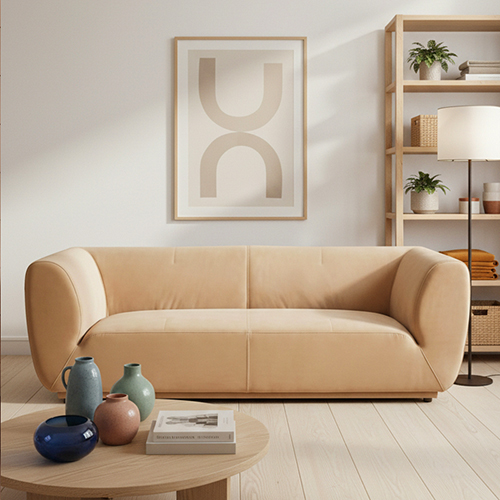
If you sell sofas, beds, tables, or cabinets online, you have almost certainly seen the phrase AI furniture photography in a vendor pitch, a Slack thread, or a competitor’s product page. The label is useful—and often misused. Some people mean “remove the warehouse background.” Others mean “type a Midjourney prompt and hope the sofa looks like ours.” Those are not the same job.
This guide defines the category for furniture ecommerce teams, explains why generic AI image tools struggle with large pieces, and shows how a product-preserving, designer-curated workflow differs from DIY prompt tools. Along the way, you’ll see how White Studio turns a few real product photos into listing packs—without inventing a different SKU.
What is AI furniture photography?
AI furniture photography turns real product photos into ecommerce-ready white-background, lifestyle, and detail images without a full studio shoot. Unlike Midjourney or ChatGPT image tools that invent a new object from a prompt, production workflows should start from your actual piece so proportions and materials stay true. White Studio combines that image-to-image approach with designer curation and delivers listing packs in 24 hours.
In plain terms: you photograph the piece you sell (often with a phone), then an AI-assisted pipeline rebuilds lighting, backgrounds, and room context around that product. The goal is commercial imagery for Shopify, Amazon, Wayfair, and wholesale portals—not concept art of a sofa that does not exist in your warehouse.
Two requirements separate useful AI furniture photography from pretty-but-wrong generators:
- Product fidelity — shape, scale, finish, and hardware should match the real SKU.
- Listing utility — outputs should cover the shot types shoppers and marketplaces expect (hero, context, detail), not a single dramatic render.
If a tool cannot do both, it may still be fun for mood boards. It is a weak foundation for a product detail page.
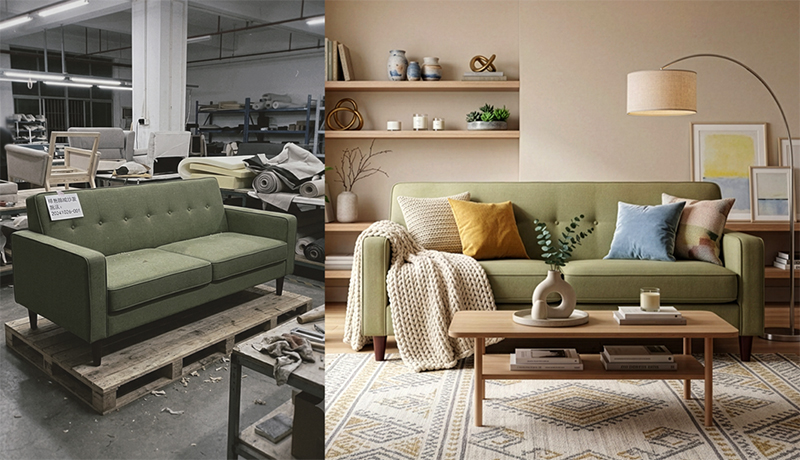
Customer source photo (left) and the delivered still (right), from a real White Studio order.
Why is furniture harder than small-SKU product AI?
Phone cases, cosmetics, and small electronics are comparatively forgiving for consumer AI apps. Furniture is not. Several structural problems show up as soon as you leave the “small object on a table” world:
Scale and silhouette. A sectional, canopy bed, or dining table fills the frame differently than a bottle. Legs, arm heights, seat depths, and overhangs must stay proportional. Generic models often shorten legs, flatten cushions, or “correct” a silhouette into something that looks stylish—and wrong.
Materials that shoppers scrutinize. Wood grain, bouclé loops, leather sheen, brushed metal, and woven cane are purchase signals. When an AI invents a smoother fabric or a warmer stain, returns risk goes up even if the image looks polished.
Room context is mandatory. Small SKUs can convert on a clean packshot alone. Furniture buyers need to judge how a piece sits in a room: scale against walls and other objects, light on surfaces, and whether the style fits their home. That means lifestyle scenes—not just cutouts.
Capture conditions are messier. Source photos often come from warehouses, showrooms, factories, or sidewalks outside a truck. Uneven light, busy floors, and partial occlusion are normal. A furniture workflow has to tolerate imperfect inputs without rewriting the product.
Category edge cases. Thin metal legs, glass tops, mirrored fronts, tufted buttons, and open shelving create segmentation and shadow problems that consumer background removers were never tuned for.
That is why furniture brands keep bouncing off general “AI product photo” tools and asking for something more specific. For a deeper comparison of production models, see AI furniture photography vs traditional photography.
Image-to-image vs text-to-image: why catalogs care
Most public AI image tools default to text-to-image: you describe a scene, and the model invents pixels that match the description. That is excellent for ideation. It is dangerous for catalogs.
Text-to-image answers: “What might a modern gray sofa look like in a coastal living room?”
Image-to-image answers: “What does this sofa look like in a coastal living room?”
Catalogs care about the second question. Your listing, ads, and marketplace feed all assume the visual matches the SKU that ships. When a prompt invents a different arm profile, cushion count, or wood tone, you are marketing a product you do not sell.
A production-minded image-to-image workflow treats the source photo as the structural anchor. AI work focuses on:
- Isolating the real product from a messy background
- Normalizing lighting toward studio-quality consistency
- Placing the same product into white-background and lifestyle environments
- Generating detail crops that still read as the same materials
Human art direction sits on top of that pipeline. Designers catch the failure modes AI still makes—odd shadows, scale drift relative to architecture, texture glitches at edges—and regenerate or correct before delivery. That hybrid is the practical middle ground between “fully automatic DIY” and “book a full traditional crew for every SKU.”
The process-level walkthrough (upload → segmentation → scenes → review) is in How the pipeline works, stage by stage below.
What does a complete furniture image set include?
Shoppers rarely buy furniture from a single front-facing photo. A useful set answers three questions: What exactly is this? How does it live in a home? What do the materials look like up close?
A practical ecommerce set usually includes:
White-background hero and angles
Marketplace-friendly shots on a clean white field, with natural contact shadows so the piece does not float. These support Amazon main images, Google Shopping feeds, comparison modules, and wholesale line sheets.
Lifestyle / room-context scenes
The product placed in believable interiors that match a chosen aesthetic. Lifestyle images help with scale perception, style fit, and emotional confidence—especially on Shopify furniture product pages, where you control the gallery.
Detail and material close-ups
Fabric weave, wood grain, stitching, hardware, joinery. Detail shots reduce “what does it feel like?” anxiety that a distant room scene cannot answer.
Optional motion
Short product video is increasingly useful for paid social, TikTok Shop, and PDP autoplay. White Studio offers it as an independent order from product photos: one 25–30 second, silent 1080p film for $199, with AI-assisted footage and human editing.
How packs map in practice (White Studio):
| Pack | What you get | Best for |
|---|---|---|
| Lite | 4 images (1 white-background, 2 lifestyle, 1 detail) | Quality test on one SKU; unblocking a thin listing |
| Standard | 16 images (4 white-background, 6 lifestyle, 6 detail) | Full listing launch across channels |
You do not need sixteen images for every experimental finish. You do need enough shot types to answer scale, material, and room-fit before you spend ad money on a cold PDP. For a concrete “one phone photo → full gallery” story, see how to create furniture lifestyle images.
Unsure whether AI furniture photography will match your finishes? Start with Lite—four designer-curated images from your real product photos—then expand winners to a Standard pack.
DIY tools vs designer-curated services
Both paths use AI. They optimize for different jobs.
DIY generators and cutout apps
Fit well when: you need a quick background swap, you have design talent in-house to prompt and QA, or you are exploring moods before committing to a SKU.
Typical friction for furniture: prompt iteration time, inconsistent results across a catalog, product hallucination, and “almost right” outputs that still need hours of Photoshop. Cutout-only tools solve background removal but do not build a coherent lifestyle system or detail set.
Designer-curated services
Fit well when: you need commercial consistency across many SKUs, your team does not want to become prompt engineers, and time-to-listing matters more than tinkering.
A curated service like White Studio’s AI furniture photography keeps the product-preserving image-to-image core, then adds human review so you download a pack instead of a folder of near-misses. You still own the decision of style direction; you do not own the night of regenerating warped legs.
A useful rule of thumb:
- Use DIY for exploration and one-off experiments.
- Use a curated pack when the images will go live on a storefront or marketplace.
- Keep traditional photography for flagship campaigns, editorial sets, and situations where physical control of light and props is the creative point—not just catalog coverage.
For a broader landscape of approaches (without fake “#1 tool” rankings), see best AI furniture photography tools.
How does White Studio work in practice?
White Studio is built as a furniture-first service, not a general prompt playground. The day-to-day workflow looks like this:
- Capture 1–3 photos of the real product with a phone or basic camera. Aim for even light, the full piece in frame, and true color. A warehouse bay, showroom corner, or factory floor is fine if the silhouette is clear.
- Upload and choose direction — product category and a style preference for lifestyle scenes. You are not writing paragraph-length prompts.
- AI generation + designer curation — models rebuild white-background and room scenes from your source photos; humans review for fidelity and commercial readiness.
- Download in 24 hours — Lite (4 images) or Standard (16 images), ready to place on listings.
- Product video, ordered separately — supply 1–3 product photos for a 25–30 second film when you need Reels, PDP video or social creatives. Human editing is included; an image pack is not required.
Shopify merchants order the same packs from the site via /order.
What you are buying is not “AI magic.” You are buying a constrained pipeline: real product in → listing pack out, with art direction in the middle. That is why the differentiator is repeated deliberately: image-to-image from the real piece, plus human curation—not Midjourney invention, not cutout-only DIY.
Home and service overview: whitestudio.art · what is White Studio · pricing.
Who is AI furniture photography for?
Independent DTC and Shopify brands who need professional galleries to compete with larger catalogs without booking a studio for every launch.
Marketplace sellers who must meet white-background norms and still want lifestyle and detail coverage that converts beyond the main image slot.
Manufacturers and wholesalers photographing prototypes or factory samples who need ecommerce-ready assets before—or instead of—a full physical shoot calendar.
Indie designers and small studios refreshing lookbooks when inventory is limited and moving pieces off-site is expensive or impossible.
Ops and merchandising teams updating finishes, fabrics, and long-tail SKUs where traditional photography’s logistics dominate the cost more than creative ambition.
It is a weaker fit for brands whose primary need is a single ultra-bespoke campaign film, celebrity staging, or physical material proofs for luxury print. Those jobs still belong with traditional creative production—often alongside AI packs for the rest of the catalog.
How the pipeline works, stage by stage
Behind a finished pack sits the same five-stage sequence, whoever runs it:
- Input normalization — orientation, exposure, and white balance are evened out so every later step works from a consistent base.
- Segmentation — the piece is separated from its surroundings, including thin legs, tufting, and contact shadows. Mistakes here cascade into every scene.
- Lighting and texture — lighting is rebuilt and materials are sharpened without changing what they are: boucle stays boucle, walnut stays walnut.
- Scene generation — white fields, room scenes, and detail crops are built around the real product in the chosen style direction.
- Human review and delivery — a person checks proportions, scale, shadows, and material truth before anything ships.
What the pipeline cannot do matters as much. It cannot document surfaces your photos never showed (the back of a cabinet is an estimate), rescue a photo too blurry to read the material, or guarantee approval for every platform edge case. The fastest way to better output is better input: three clear angles, even daylight, a plain background, accurate white balance, and a clean product.
FAQ
Do I own the commercial rights to the images?
White Studio delivers images for commercial listing and marketing use as part of the pack purchase. For current rights language and edge cases, check the FAQ and order terms before large catalog rollouts.
How fast is turnaround?
Image packs are delivered within 24 hours of payment confirmation for an order with complete product photos. Product video is an independent service, estimated at 3 business days after payment and material acceptance; AI-assisted footage is selected and edited by hand.
Are phone photos good enough?
Usually yes—if the piece is fully visible, reasonably sharp, and color is roughly accurate. You do not need a studio camera. Extremely dark, blurry, or heavily occluded inputs limit what any pipeline can recover; the AI enhances what is there, it does not invent missing structure. For capture tips, see how to create furniture lifestyle images.
When should I still book traditional photography?
Book a traditional shoot when you need on-set creative control that is the product itself: flagship brand films, complex prop narratives, exact physical samples for luxury campaigns, or situations where stakeholders require photographic capture as a contractual standard. Use AI furniture photography for catalog coverage, marketplace compliance, and fast variant refreshes. Many teams run both: traditional for heroes, curated AI for the long tail.
Is this the same as Midjourney or ChatGPT image generation?
No. Those tools excel at inventing scenes from text. Catalog work needs image-to-image preservation of your SKU plus review. If a workflow starts from a prompt instead of your product photo, treat the output as concept art until proven otherwise.
Where do I start if I only want to test quality?
Order Lite (4 images) on one representative SKU. If fidelity and style match your brand, move that product—and siblings—to Standard (16 images) for a full listing set.
Next step: build a listing pack from the piece you already have
AI furniture photography is not a filter, and it is not a prompt contest. For furniture ecommerce, it is a production method: start from real product photos, preserve the SKU with image-to-image models, and use designer curation so the download is listing-ready.
When you are ready for a complete gallery—white backgrounds, lifestyle scenes, and detail shots—choose the Standard pack and upload 1–3 phone photos. Prefer a low-risk first look? Start with Lite, then scale what works.
Explore the service at AI furniture photography, skim pricing, and start an order.