 white studio
Amazon Furniture Product Images Requirements (2026 Checklist + How Many Shots)
By Vee S. · Founder, White Studio

Selling furniture on Amazon means competing in a crowded search results grid where the thumbnail does most of the selling. Shoppers scroll past hundreds of sofas, bed frames, and dining sets; they pause when an image reads clearly at small size, looks professionally lit, and promises a product that matches what arrives at the door. Amazon’s image policies exist to keep that grid fair and legible—but furniture sellers often discover those policies only after uploads fail or listings lose the Buy Box visibility they expected.
This guide summarizes Amazon furniture product images requirements in practical terms: main-image rules, secondary/lifestyle/detail slots, technical file specs, a concrete how many + which shots checklist, and workflows for producing compliant assets without an in-house studio.
Amazon updates Seller Central documentation periodically. The source of truth is Amazon's product image requirements page in Seller Central; verify it for your category before bulk uploads. The principles below reflect stable policy themes furniture brands encounter repeatedly—not a substitute for the live help center.
Why Amazon image rules matter more for furniture
Furniture SKUs differ from small-pack consumer goods in ways that intersect directly with imaging policy.
Higher return stakes. A misrepresented sectional generates freight-heavy returns and negative reviews that hurt account health. Accurate gallery images are risk management, not decoration.
Complexity of scale. Buyers struggle to judge dimensions from a single thumbnail. Supplementary images must clarify size, configuration, and material without violating text-overlay restrictions on the main image.
Long purchase consideration. Shoppers open multiple tabs, zoom lifestyle images, and read A+ content. A complete, compliant gallery supports conversion across that journey.
Strict main-image enforcement. Amazon’s algorithms and manual reviewers reject main images that include props, lifestyle backgrounds, logos, or non-white backgrounds. Furniture’s natural inclination toward room scenes must be channeled into secondary slots—not the hero frame.
Understanding these requirements upfront prevents costly rework and listing suppression during peak seasons.
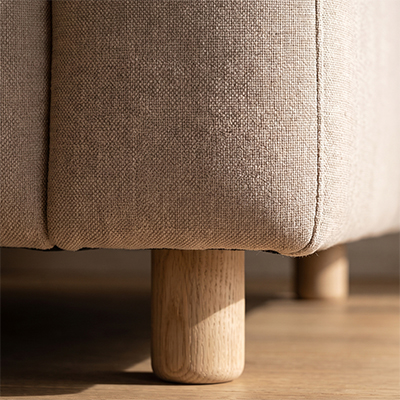
A delivered detail shot, the kind of secondary image that answers material questions in a marketplace gallery.
Main image requirements (the hero slot)
The main image—IMAGE-1 / primary offer image—faces the strictest rules. For most furniture categories, expect (and confirm in Seller Central):
Pure white background
The product should appear on RGB 255, 255, 255 white with no visible floor line, gradient, or environmental shadow that reads as a scene. Subtle contact shadow directly under legs is sometimes tolerated if minimal; aggressive cast shadows may trigger rejection.
Product fills the frame
Amazon-style guides commonly recommend the product occupy 85% or more of the image area. Furniture pieces with unusual aspect ratios—long dining tables, wide sectionals—require careful cropping so the piece feels substantial without clipping structural elements.
No props, text, logos, or badges
The main image must show only the product. No “Sale” banners, no dimension callouts, no lifestyle accessories, no inset swatches. Dimension diagrams belong in secondary images or A+ modules per current policy interpretations—verify before upload.
No placeholder graphics / amateur presentation
Skip “image coming soon” frames. Blurry or poorly lit photos underperform even when accepted.
For a step-by-step white-background production path (capture tips, DIY failure modes, pack workflow), see our guide to white-background furniture photos.
Secondary and lifestyle images
Amazon allows additional images in the offer gallery—commonly discussed as roughly up to about 6–8 secondary offer images, plus video and A+ content where eligible. Exact slot counts and eligibility change; verify current Seller Central for your account. Secondary slots accept lifestyle scenes, infographics, and detail shots subject to content policies.
Lifestyle images
Show the product in realistic interior settings: living room for upholstery, bedroom for frames, dining space for tables and chairs. Avoid misleading scale—do not place a compact loveseat in a cavernous loft shot that implies incorrect dimensions.
Lifestyle may include props and context—not pricing text, prohibited claims, or offensive content.
Detail and material images
Close crops of fabric, wood grain, hardware, and joinery reduce buyer uncertainty. Align regulated claims (e.g. FSC wood) with documentation elsewhere in the listing.
Dimension and infographic images
Many brands add dimension diagrams in secondary slots. Confirm current policy on text/graphic overlays—rules evolve. Clean inch/cm diagrams perform well when permitted.
Alternate angles and configurations
Modular sofas, extendable tables, and bunk beds benefit from alternate setups. Imaging must match the exact ASIN; separate configurations may need separate SKUs or variation relationships.
How many product images does an Amazon furniture listing need?
Amazon furniture listings need a pure-white, product-only main image plus secondary shots that answer scale, material, and room-fit. Exact gallery limits change—verify Seller Central—but furniture converts when shot types are covered: white hero, alternate angles, lifestyle context, material/detail, and clear scale or dimensions. Coverage beats a magic number. If you only have phone or warehouse photos, a designer-curated image-to-image pack (White Studio Lite / Standard) can produce Amazon-oriented masters in 24 hours without inventing a different SKU.
Shot-type → Amazon slot map
| Shot type | Job it does | Typical Amazon slot |
|---|---|---|
| White hero | Catalog comparison, search thumbnail, compliance | IMAGE-1 (main) |
| White / alternate angles | Silhouette truth, depth, arm/leg clarity | Early secondary |
| Lifestyle / room context | Style fit and emotional confidence | Secondary |
| Detail / material | Weave, grain, stitching, hardware trust | Secondary |
| Dimension / infographic | Reduce “looked smaller online” returns | Secondary (policy hedge—verify overlays) |
| Configuration / functional | Modular layouts, leaves extended, drawers open | Secondary as needed by ASIN |
Minimum vs competitive set
- Thin 2–3 image ASIN: Often a white-ish hero plus one lifestyle or angle. Enough to go live; rarely enough to compete on high-consideration sofas or beds, and easy to suppress if the hero fails white-BG rules.
- Useful baseline (about 5–8): White hero, 1–2 angles, at least one lifestyle, material detail, plus a scale or dimension cue where policy allows.
- Competitive furniture gallery (about 8–13 stills + optional video/A+): Fuller lifestyle and detail coverage that survives zoom, ads, and comparison shopping.
Lite (4) vs Standard (16)
Map packs to Amazon goals—not vanity counts:
| Pack | What you get | Best for on Amazon |
|---|---|---|
| Lite | 4 designer-curated images | Fidelity test on one ASIN; unblocking a suppressed or thin hero |
| Standard | 16 images (typically white + lifestyle + detail mix) | Filling a competitive furniture gallery from phone/warehouse photos |
Validate white-hero fidelity on one ASIN first with Lite (4 images from your real product photos), then expand winners to Standard. See Cases, AI furniture photography, and order.
Technical file specifications
Amazon's product image requirements (Seller Central, sign-in required) set the file rules. As of September 2026 the core specs are:
- Formats: JPEG, PNG, TIFF, or non-animated GIF (JPEG is the norm)
- Main image background: pure white, RGB 255, 255, 255
- Frame fill: the product should occupy about 85% of the main image
- Zoom: images need 1,000 px or more on the longest side to enable zoom; for furniture detail, 2,000+ px is the safer target
- Content: the actual product only—no text, logos, watermarks, inset images, or mockups on the main image
- Color mode: sRGB for predictable display
Consistent internal naming (SKU_white_front.jpg) simplifies ops. Upload sharp masters; Amazon’s CDN serves display sizes. Do not upscale weak sources.
Category-specific furniture considerations
Imaging needs vary by browse node (sofas, bedroom, dining, home office, storage).
Upholstered seating
Full silhouette including legs and arms; detail seams and fabric texture. If throw pillows are included, keep them consistent across images or clarify in bullets.
Beds and bed frames
Distinguish frame-only vs mattress-included visually and in copy. Use standard mattress proportions in lifestyle; add secondary shots for slats and headboard height when helpful.
Tables, desks, cabinets
Control glare on glass/gloss; show edge profiles and hardware. For extendable tables, show leaves extended and collapsed if both ship. Interior capacity shots help storage SKUs—without cluttering the white hero.
White Studio intake covers sofa, bed, table and chair, cabinet. Upload 1–3 phone photos for a gallery-oriented pack within a day.
Common rejection reasons and fixes
Seller forums repeatedly cite these issues:
| Problem | Fix |
|---|---|
| Off-white or gray background on main image | Regenerate on pure white; check export settings |
| Product too small in frame | Re-crop or reshoot closer; target 85%+ fill |
| Text or logo on main image | Move graphics to secondary slots or A+ |
| Props visible in main image | Isolate product only in hero frame |
| Blurry or pixelated upload | Source higher-resolution masters |
| Incorrect product shown for variation | Align ASIN-variant mapping with images |
Preventive QA beats reactive fixes—run every file against your Amazon checklist before upload.
Amazon A+ Content and video
Eligible brand owners access A+ modules (comparison charts, lifestyle banners, narratives). Keep A+ styling consistent with the offer gallery and avoid misleading scale differences—returns follow what shoppers saw at checkout.
Video and 360° spins are optional complements. Still compliance is mandatory; produce trustworthy stills first.
Producing compliant images without a studio
Manual Photoshop per SKU does not scale for seasonal fabric rotations. Patterns that work:
Phone / warehouse intake
Daylight or even warehouse light, full product in frame, multiple angles. No cyclorama required to start.
Image-to-image + designer curation
Amazon rejects bad main images and punishes inaccurate galleries. White Studio builds packs image-to-image from the real product photo with designer curation—so white hero and lifestyle/detail slots stay catalog-true (vs Midjourney/ChatGPT inventing a different SKU, or cutout apps that stop at background removal). See AI furniture photography and What is White Studio?.
Slot mapping + turnaround
Define IMAGE-1 white front, IMAGE-2 white angle, IMAGE-3 lifestyle, IMAGE-4 detail, etc., then map Standard-pack files into that template. Typical White Studio stills packs land in 24 hours after a complete upload—aligned with inbound inventory and Buy Box readiness.
Accuracy, reviews, and account health
High return rates and “item not as described” complaints hurt account health. Images that exaggerate scale or misrepresent color feed those metrics. Prefer faithful representation over idealized renders; disclose natural material variance in copy and show representative swatches in secondary images. Commercial-use questions for delivered packs: /faq.
Workflow checklist before upload
- Confirm main image is pure white, product-only, high resolution, about 85%+ fill
- Verify shot-type coverage from the how-many map above—not three near-identical fronts
- Check secondary lifestyle images show realistic scale without deceptive staging
- Include detail shots addressing common buyer questions for the subcategory
- Match variation images to correct child ASINs
- Export in sRGB JPEG at sufficient pixel dimensions
- Run internal QA against the latest Seller Central image guide for your category
- Archive masters for future policy changes or marketplace expansion
Beyond Amazon: multichannel consistency
Amazon’s white-background main-image rule is stricter than Shopify or Etsy. Keep layered masters: white heroes for Amazon, lifestyle crops for social, mixed galleries for DTC. Structured sixteen-image packs simplify multichannel crops from one session. Owned-store how-many checklist: Shopify furniture product images. Wayfair room-scene expectations: Wayfair furniture image requirements.
FAQ
Can the Amazon furniture main image include props or text?
No—for most furniture categories the main image must be product-only on pure white, with no props, logos, badges, or text overlays. Move lifestyle, dimensions, and callouts to secondary slots or A+ (where eligible). Always re-check Seller Central for your browse node.
How many lifestyle shots does an Amazon furniture listing need?
Enough to answer room-fit without repeating the same angle. One strong lifestyle scene is a useful minimum; competitive ASINs often use multiple context shots alongside angles and details. Prioritize honest scale over volume.
Is Lite (4 images) enough to launch an Amazon ASIN?
Lite is a low-risk quality and fidelity test—ideal when you need to validate a white hero or unblock a thin listing. For a competitive furniture gallery, plan toward Standard (16 images) or an equivalent shot-type set you produce in-house.
Do finish or fabric variations each need a full gallery?
Not always on day one. Prioritize hero finishes with full coverage; share lifestyle language carefully and add dedicated shots where color or material shifts buyer perception. Align every image to the exact child ASIN.
Should I add video before stills are solid?
No. Compliant stills come first. Add short video or 360° content after the offer gallery is trustworthy and the main image passes review.
Do I get commercial rights to use the images on Amazon?
White Studio packs are built for commercial listing use. See /faq for the current rights summary, then confirm any marketplace-specific advertising rules in Seller Central.
Next step: ship a compliant Amazon furniture gallery
Amazon furniture product images requirements reward clarity, compliance, and completeness: pure-white hero, secondary lifestyle/detail/scale coverage, and high-resolution sRGB files that zoom cleanly. Shot types—not a magic number—decide whether shoppers trust the ASIN. Standardized slots and fixed per-SKU packs beat treating every listing as a creative emergency.
When you are ready to fill a competitive gallery from warehouse phone photos, choose Standard (about 16 images) or test with Lite. Explore Cases, AI furniture photography, What is White Studio?, the white-background guide furniture background generator, and start an order.