 white studio
How to Photograph Furniture for Ecommerce (Setup, Lighting, and Shot List)
By Vee S. · Founder, White Studio
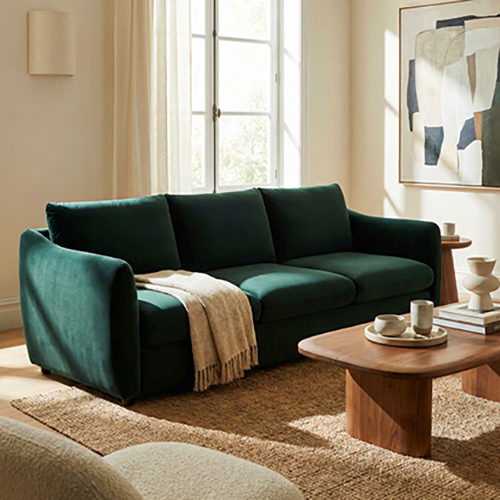
To photograph furniture for ecommerce, use soft directional light (a large window or softboxes), step back instead of shooting ultra-wide, keep the camera level so legs and proportions stay true, and capture a purposeful set: hero angle, alternates, material details, and optional room context. Those real product photos are the right source for marketplace listings—and for image-to-image workflows. White Studio turns 1–3 strong phone or warehouse shots into designer-curated white-background, lifestyle, and detail packs (Lite / Standard) in 24 hours, without inventing a different SKU.
This is our main guide to photographing furniture for ecommerce. Phone-only field checklists live in how to photograph furniture with a smartphone. Deep lighting setups live in furniture photography lighting guide. Here we bring the practical tips, setup, and ecommerce angles into one workflow you can run in a warehouse, showroom, or factory bay.
How to photograph furniture for ecommerce (quick start)
Do this first. Everything else in this guide expands the same checklist.
- Light soft and directional — face a large window or place softboxes at roughly 45°. Kill mixed overhead fluorescents when you can.
- Back up; avoid ultra-wide — fill the frame by stepping back, not by stretching the lens. Distorted legs follow the product into every downstream image.
- Keep the camera level — check vertical edges on cabinets and table legs. A slight tilt reads as “cheap” even when the piece is not.
- Shoot a purposeful set — at minimum: three-quarter hero, one alternate angle, one material detail. Add side/back and room context when the SKU needs it.
- Decide the finish path — publish cleaned white/lifestyle yourself, or upload strong sources to a product-preserving pipeline like AI furniture photography when you need a full gallery without a studio day.
If you only have ten minutes on the floor, complete steps 1–4. A clean hero plus one detail is already enough to try a Lite pack (4 images) and see whether curated output beats another week of DIY retouching.
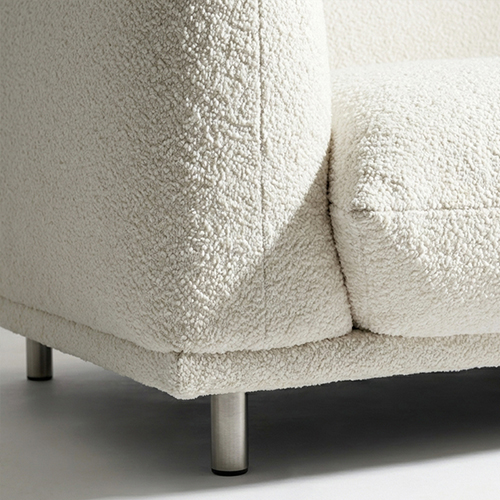
A delivered detail shot: texture survives only if the source photo captured it.
Gear that actually matters (and what doesn’t)
You do not need a tilt-shift kit to sell a sofa online. You need light quality, honest proportions, and a repeatable angle checklist.
Minimum viable setup
- Recent smartphone (main camera, not ultrawide) or entry-level mirrorless
- Tripod or stable surface — optional but huge for consistent catalog height
- Large window or two soft continuous lights / softboxes
- Foam-board reflector for fill
- Clean wall, seamless paper, or enough open floor that the silhouette is readable
Worth upgrading when volume rises
- 24–70mm-equivalent lens (avoid shooting large pieces with extreme wide glass)
- Gray card for white balance across a long shoot day
- Simple stands and diffusion so you are not chasing sun patches
What usually does not matter yet
- Brand-name camera bodies
- Exotic modifiers before you fix mixed color temperature
- Heavy in-camera “beauty” filters that crush grain and shift wood tones
Phone vs mirrorless is a logistics choice, not a quality ceiling. A well-lit phone capture outperforms a poorly lit full-frame file. For a phone-specific walkthrough, use the smartphone furniture photography guide; keep this page as the broader ecommerce/setup playbook.
Lighting setup for large pieces
Furniture is big. Small hard lights create harsh falloff across cushions and tabletops. Prefer large soft sources.
Window as softbox. Park the piece near a large window with indirect light. North-facing windows (in the northern hemisphere) are forgiving. Pull sheer curtains if sun patches blow highlights on fabric or lacquer.
Softboxes at about 45°. One key at forty-five degrees, fill opposite at lower intensity (bounce a foam board if you lack a second light). Add rim light only when dark pieces disappear into dark walls.
Kill mixed overheads. Daylight plus warehouse fluorescents produces color splits you cannot fully fix later—especially across a long sofa arm. Turn off the wrong sources or shoot after hours when you control the bay.
Watch glare. Glass tops, polished metal, and high-gloss lacquer mirror every lamp and window. Angle the camera or flag the light; some reflection is honest—equipment reflections are not.
When you need modifier diagrams, power ratios, and material-specific lighting recipes, see the furniture photography lighting guide.
Angles and composition that protect proportions
Camera height. For sofas and chairs, start near seat height or slightly above. For case goods, closer to eye level. For low tables, a gentle elevation that shows the top plane without turning legs into stilts.
Three-quarter hero. The default thumbnail: enough front for recognition, enough side for depth. Confirm legs, feet, and overhangs are fully in frame.
Straight front and side. Symmetrical sofas, headboards, and bookcases need a true front. Side profiles reveal arm thickness, apron depth, and leg design.
Protect verticals. Keep camera level; step back rather than tilting. Melting cabinet edges and bowed legs are a top reason buyers say “looks smaller / different in person.”
Scale cues when possible. A dining chair beside a table, a standard door in the background, or a later dimension overlay beats guessing. Do not fake scale with ultra-wide closeness.
Material honesty over drama. Soft light that reads bouclé, grain, and stitching beats theatrical shadows that hide finish mismatches.
The shot list: white-ready, lifestyle context, and details
Think in three jobs shoppers and marketplaces ask:
| Job | Shot types | Typical use |
|---|---|---|
| What exactly is this? | Clean hero + alternate angles on simple BG | Main image, Shopping feeds, comparison grids |
| How does it live? | Room or lifestyle context | PDP gallery, ads, email |
| What does it feel like? | Material, hardware, joinery details | Zoom, returns prevention |
Minimum useful set (busy intake day)
- Three-quarter hero (full silhouette)
- Alternate angle (front or side)
- One material/hardware detail
Fuller PDP coverage
- Straight front and back (sofas, desks, storage)
- Side profile
- Open drawers / modular connections / extension leaves when they define the SKU
- Lifestyle or room-context frame if you have a clean corner—or plan to generate lifestyle from the same sources
One strong photo can power a pack; two or three reduce guesswork on depth and materials. For the lifestyle-from-phone path specifically, see furniture lifestyle images from phone photos. For what “AI furniture photography” means in production terms, see what is AI furniture photography.
Background and staging choices
Clean wall or seamless. Best when you will publish white or near-white heroes yourself. Sweep floors, tape backdrop edges, remove price tags and cables.
Warehouse / showroom floor. Fine as source for image-to-image workflows. Busy cardboard and concrete are normal; occlusion is not. Pull the piece into open space so legs and outline are readable.
In-room lifestyle. Powerful when styled with discipline; expensive to scale physically across a catalog. Many teams capture product truth on the floor, then place the same SKU into rooms via curated packs instead of booking a set per finish.
What to leave messy if AI will replace the background later. Floor dust and distant inventory are usually ok. Plastic wrap that hides the silhouette, overlapping SKUs, and people standing in frame are not. Capture truth; do not pre-composite marketing treatments that fight the next pipeline.
From phone/warehouse shots to listing-ready packs
Two valid workflows coexist.
Direct publication. Shoot, retouch, upload. Right when you already have studio capacity and need only a few SKUs.
Reference → curated production. Capture 1–3 clean sources; submit to a product-preserving image-to-image service; receive white-background, lifestyle, and detail images with human art direction.
That second path is where White Studio sits. Unlike Midjourney-style text-to-image tools that invent a different sofa from a prompt, or cutout apps that stop at a white background, White Studio starts from your photos, preserves proportions and materials, and delivers designer-reviewed packs in 24 hours.
Already have a clean hero + detail from today’s intake? Try Lite (4 images) to validate fidelity on one SKU before you rebuild the whole catalog. Compare packs and volume on pricing.
Common mistakes that cause returns
Color cast from mixed lights. Shoppers compare monitor to doorstep. Wrong white balance on wood and fabric drives “not as pictured” tickets.
Ultra-wide melt. Stretching a sectional to fit the frame warps legs and seat depth. Step back; crop later.
Single front angle only. No side, no detail, no scale cue—buyers cannot judge depth or materials, so they either bounce or order and return.
Missing material shots. Bouclé, veneer transitions, and brushed metal need close frames. A distant hero cannot carry tactile trust alone.
Inconsistent camera height across the catalog. Collection grids look accidental when every SKU was shot at a different elevation.
Publishing warehouse heroes without a plan. Raw bay photos can work as sources; they rarely win as final main images next to competitors with clean white + lifestyle sets.
Over-editing before upload to an AI pack. Heavy filters, warped perspective “fixes,” and pre-cut backgrounds remove information the pipeline needs. Prefer accurate color and full silhouette.
FAQ
Do I need a camera, or is a smartphone enough?
A modern smartphone is enough for ecommerce source photos when you use the main lens, soft light, and a full silhouette. Cameras help with volume, tethering, and RAW flexibility—not as a prerequisite. Keep the smartphone guide for field technique; use this page for the full ecommerce shot-list and pack path.
How should I photograph outdoor furniture?
Prefer open shade or cloudy daylight so color stays even across frames, cushions, and powder-coated metal. Watch specular glare on mesh and aluminum; angle slightly rather than blasting fill. Include a scale cue—door, railing, or dining chair—because outdoor pieces are often misjudged from phone distance.
How do I handle glass, mirrors, and polished metal?
Accept some honest reflection; remove photographer and light-stand reflections by changing angle or flagging lights. Avoid shooting glass tops straight into bright windows. One clean detail of edge thickness helps shoppers trust tempered glass and metal finishes.
When should I still book a traditional studio?
Book a studio when you need on-set art direction for a brand campaign, complex multi-piece vignettes with props you must own physically, or when legal/marketplace partners require a supervised shoot. For catalog refresh velocity across many SKUs, good capture plus curated AI furniture photography often beats waiting for studio slots—see also AI vs traditional furniture photography.
How many source photos do I need for White Studio?
One strong photo can generate a pack; 1–3 angles (hero + alternate + detail) reduce ambiguity on depth and materials. Lite delivers 3 curated images to test the workflow; Standard delivers 13 (white + lifestyle + details) for a fuller listing set from the same sources.
Will AI change my product’s proportions?
It should not—not in a catalog-safe workflow. Insist on image-to-image from the real product plus human review. Text-to-image generators answer “what might a gray sofa look like?” Catalog work needs “what does this sofa look like?” That differentiator is the core of what is AI furniture photography.
Capture well, then scale the gallery
Furniture photography for ecommerce is not a gear arms race. Soft directional light, a level camera, honest materials, and a short purposeful shot list protect the SKU. From there, you can publish directly—or feed the same real photos into designer-curated packs when you need white backgrounds, lifestyle scenes, and details without another warehouse day.
Ready for a full listing set from the photos you already know how to take? Start with Standard (16 images) or compare tiers on pricing. Explore the service at AI furniture photography, see how one photo becomes a lifestyle set, and keep the smartphone capture guide handy on the floor. Questions on rights and delivery sit on the FAQ.